> ## Documentation Index
> Fetch the complete documentation index at: https://docs.sequencehq.com/llms.txt
> Use this file to discover all available pages before exploring further.
# Workflows
> Design multi-step automations with a visual builder
 Workflows let you design quote approvals, contract intake, and other multi-step processes on a visual canvas. When a run requires human review, it sends a notification to [Watchtower](/agents/watchtower).
**Use Workflows to:**
## Getting started
Go to Workflows in the sidebar and create a new workflow. Click the Start node and choose a trigger: Quote approval (when a sales rep submits a quote), Contract uploaded (when a contract PDF is uploaded or forwarded), or Invoice sent (when an invoice is sent to a customer, used for [payment reminders](/agents/payment-reminders)). Publishing a workflow makes it the active workflow for its trigger; see [Publishing](#publishing).
Workflows let you design quote approvals, contract intake, and other multi-step processes on a visual canvas. When a run requires human review, it sends a notification to [Watchtower](/agents/watchtower).
**Use Workflows to:**
## Getting started
Go to Workflows in the sidebar and create a new workflow. Click the Start node and choose a trigger: Quote approval (when a sales rep submits a quote), Contract uploaded (when a contract PDF is uploaded or forwarded), or Invoice sent (when an invoice is sent to a customer, used for [payment reminders](/agents/payment-reminders)). Publishing a workflow makes it the active workflow for its trigger; see [Publishing](#publishing).
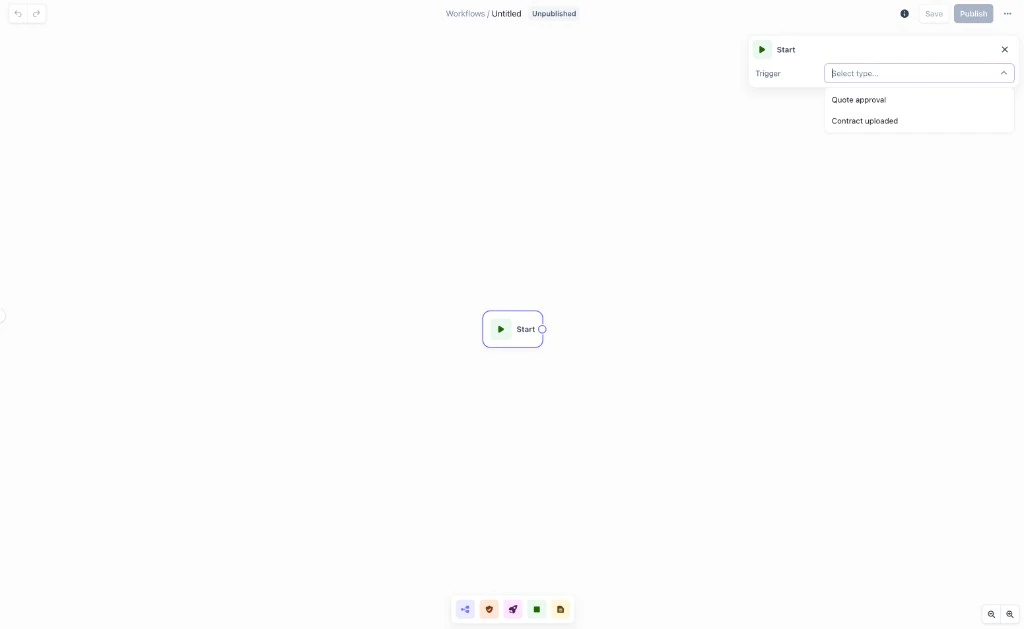 Use the toolbar at the bottom to add Switch, Review, Action, Reminder, End, and Note nodes. Connect them by dragging edges between nodes. Click any node to open its configuration panel. Save to preserve your draft; Publish when the workflow is ready to go live.
 ## Node types
| Node | Purpose |
| -------- | ----------------------------------------------------------------------------------------------------------------- |
| Switch | Route the run down different branches based on conditions |
| Review | Pause the run and create an approval task in Watchtower |
| Action | Run a Sequence operation (publish quote, create schedule, etc.) |
| Reminder | Send a payment reminder for an invoice, with optional review (see [Payment reminders](/agents/payment-reminders)) |
| End | Terminate a branch |
| Note | Canvas annotation; does not execute |
## Switch node
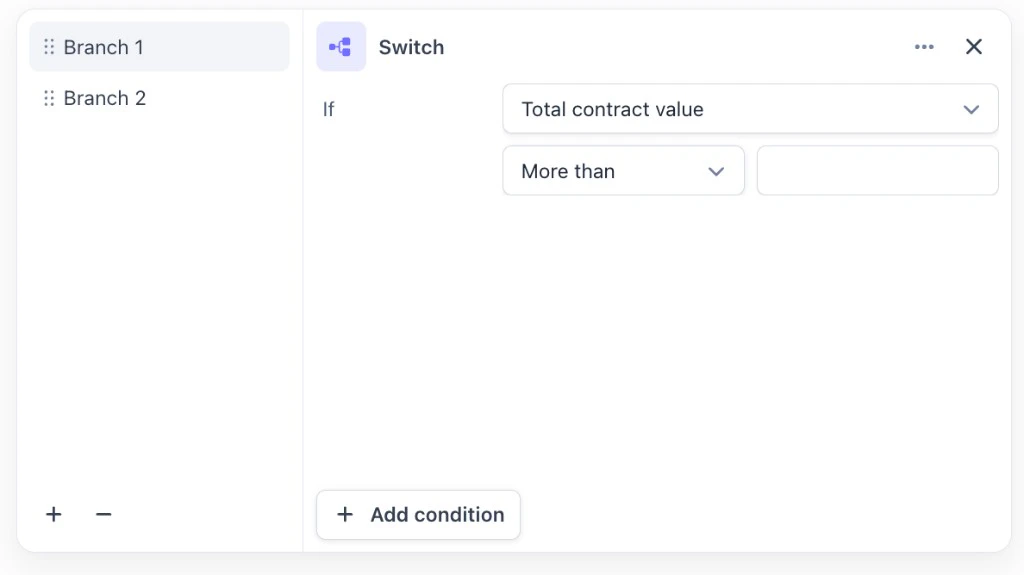
The Switch node evaluates conditions against the quote or contract data and routes the run down the matching branch. Add branches with + and remove them with −. The final branch is always Else (catch-all for runs that do not match any condition).
Each branch has one or more conditions; multiple conditions on a branch use AND logic. Available properties: Total contract value, Total discount value, Products, Product pricing model, Product discount, Currency, Raw text, Comment. For payment reminder workflows you can also branch on Customer (include/exclude specific customers) and Invoice total.
## Node types
| Node | Purpose |
| -------- | ----------------------------------------------------------------------------------------------------------------- |
| Switch | Route the run down different branches based on conditions |
| Review | Pause the run and create an approval task in Watchtower |
| Action | Run a Sequence operation (publish quote, create schedule, etc.) |
| Reminder | Send a payment reminder for an invoice, with optional review (see [Payment reminders](/agents/payment-reminders)) |
| End | Terminate a branch |
| Note | Canvas annotation; does not execute |
## Switch node
The Switch node evaluates conditions against the quote or contract data and routes the run down the matching branch. Add branches with + and remove them with −. The final branch is always Else (catch-all for runs that do not match any condition).
Each branch has one or more conditions; multiple conditions on a branch use AND logic. Available properties: Total contract value, Total discount value, Products, Product pricing model, Product discount, Currency, Raw text, Comment. For payment reminder workflows you can also branch on Customer (include/exclude specific customers) and Invoice total.
 ## Review node
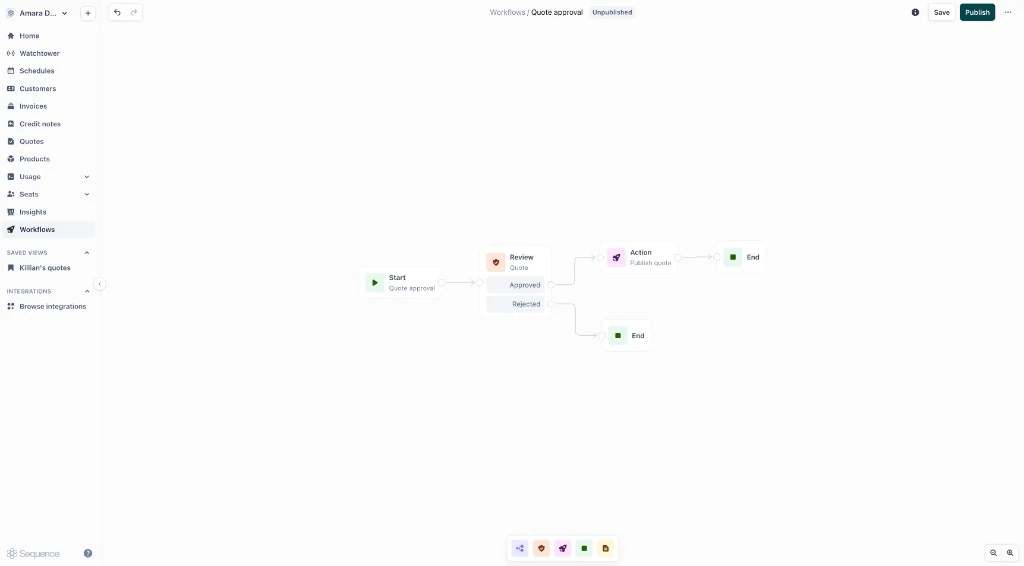
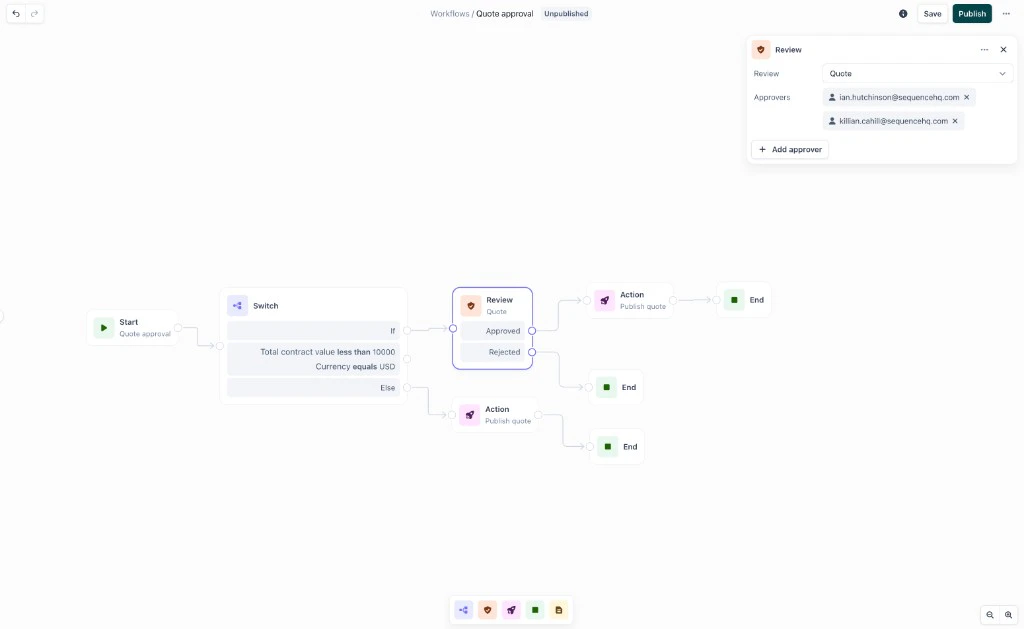
The Review node pauses the workflow and creates a task in Watchtower assigned to the approvers you configure. The run holds until someone completes it. Configure the review type (e.g. Quote) and add approvers. The node exposes Approved and Rejected output paths; connect each to the appropriate next step.
## Review node
The Review node pauses the workflow and creates a task in Watchtower assigned to the approvers you configure. The run holds until someone completes it. Configure the review type (e.g. Quote) and add approvers. The node exposes Approved and Rejected output paths; connect each to the appropriate next step.
 ## Action node
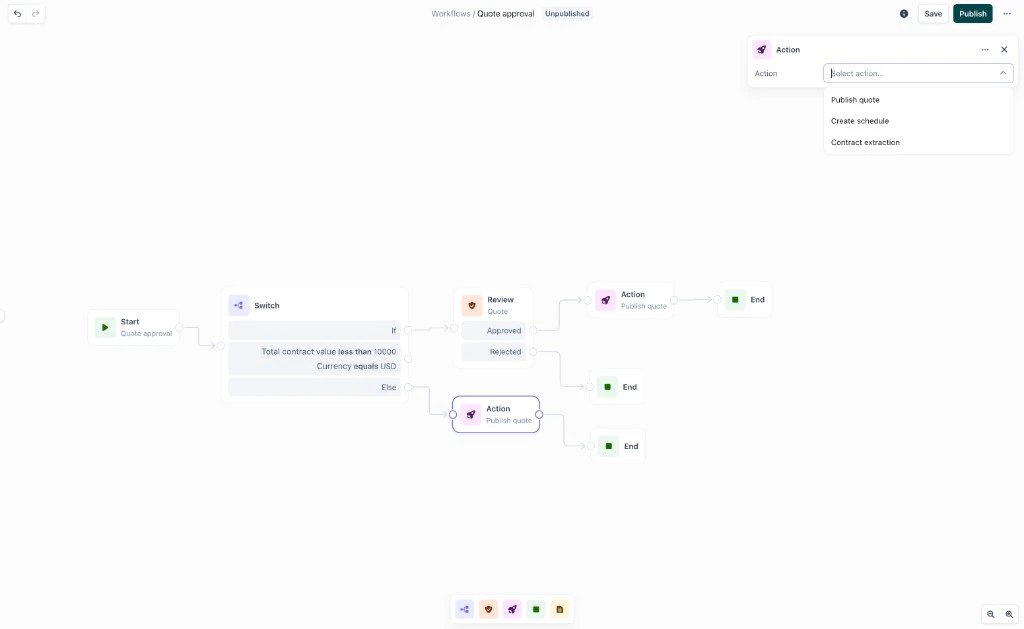
The Action node runs a Sequence operation when a condition is met or a review is approved. Available actions: Publish quote, Create schedule, Contract extraction.
## Action node
The Action node runs a Sequence operation when a condition is met or a review is approved. Available actions: Publish quote, Create schedule, Contract extraction.
 ## Reminder node
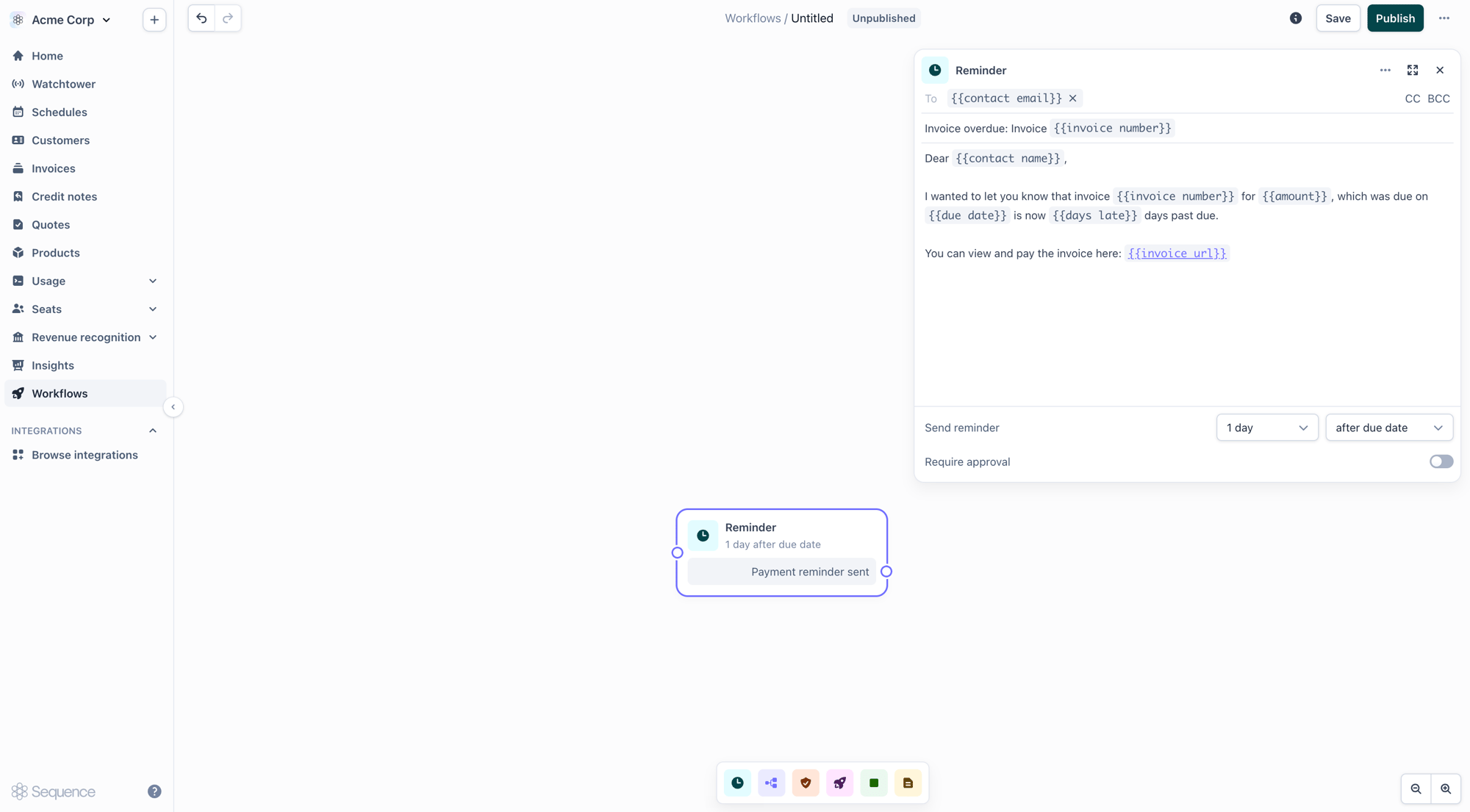
The Reminder node sends a payment reminder for an invoice. It packages a configurable wait, an invoice check, email composition, an optional review step, and the send into a single node. Chain several to build a dunning sequence. Use it with the Invoice sent trigger. See [Payment reminders](/agents/payment-reminders) for full configuration (timing, template variables, approval, and webhooks).
## Reminder node
The Reminder node sends a payment reminder for an invoice. It packages a configurable wait, an invoice check, email composition, an optional review step, and the send into a single node. Chain several to build a dunning sequence. Use it with the Invoice sent trigger. See [Payment reminders](/agents/payment-reminders) for full configuration (timing, template variables, approval, and webhooks).
 ## Note node
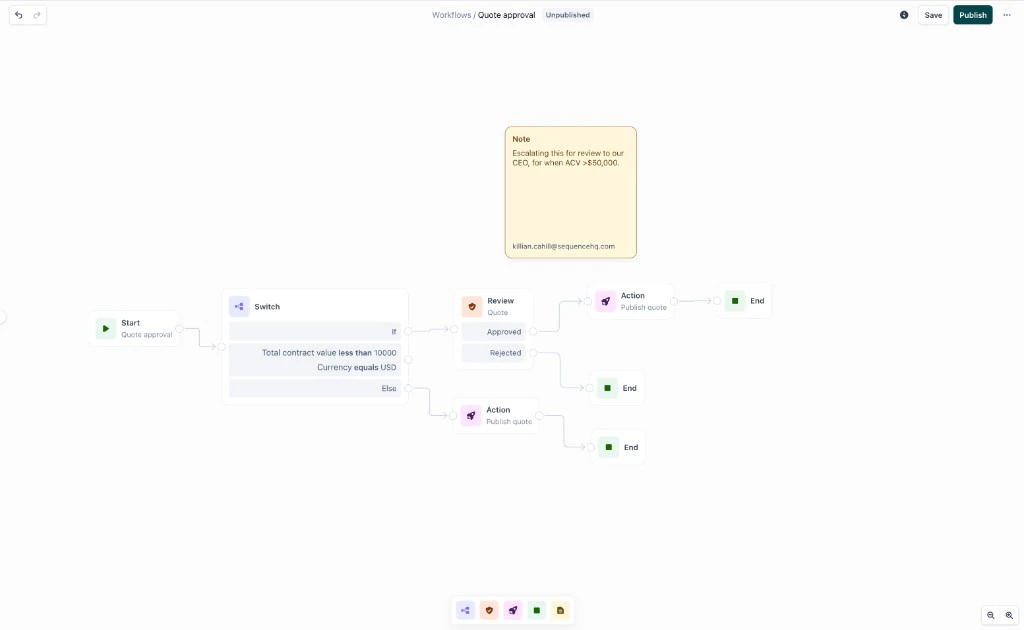
The Note node is a canvas annotation. It does not execute. Use it to explain branches, record policy decisions, or leave context for future editors.
## Note node
The Note node is a canvas annotation. It does not execute. Use it to explain branches, record policy decisions, or leave context for future editors.
 ## Publishing
Workflows start as drafts. Save and return as needed. When ready, Publish. The workflow then runs for every new trigger event. Version history records what was running at any point in time. Edit the draft and republish to update logic without interrupting in-flight runs.
Only one workflow is active per trigger at a time. If you publish a workflow whose trigger is already used by another active workflow, the existing one is deactivated and yours takes its place, with no gap in coverage, and the confirmation names and links to the workflow being deactivated. You can keep as many draft workflows as you like for the same trigger.
## Quote approval flow
A sales rep submits a quote for approval in Sequence. The request comment is captured and attached to the run.
The workflow runs the Switch node against your conditions (deal size, discount, currency, products). The run takes the first matching branch.
The run pauses at the Review node. A task appears in Watchtower for the assigned approvers with the full quote, requestor details, and sales rep comment.
## Publishing
Workflows start as drafts. Save and return as needed. When ready, Publish. The workflow then runs for every new trigger event. Version history records what was running at any point in time. Edit the draft and republish to update logic without interrupting in-flight runs.
Only one workflow is active per trigger at a time. If you publish a workflow whose trigger is already used by another active workflow, the existing one is deactivated and yours takes its place, with no gap in coverage, and the confirmation names and links to the workflow being deactivated. You can keep as many draft workflows as you like for the same trigger.
## Quote approval flow
A sales rep submits a quote for approval in Sequence. The request comment is captured and attached to the run.
The workflow runs the Switch node against your conditions (deal size, discount, currency, products). The run takes the first matching branch.
The run pauses at the Review node. A task appears in Watchtower for the assigned approvers with the full quote, requestor details, and sales rep comment.
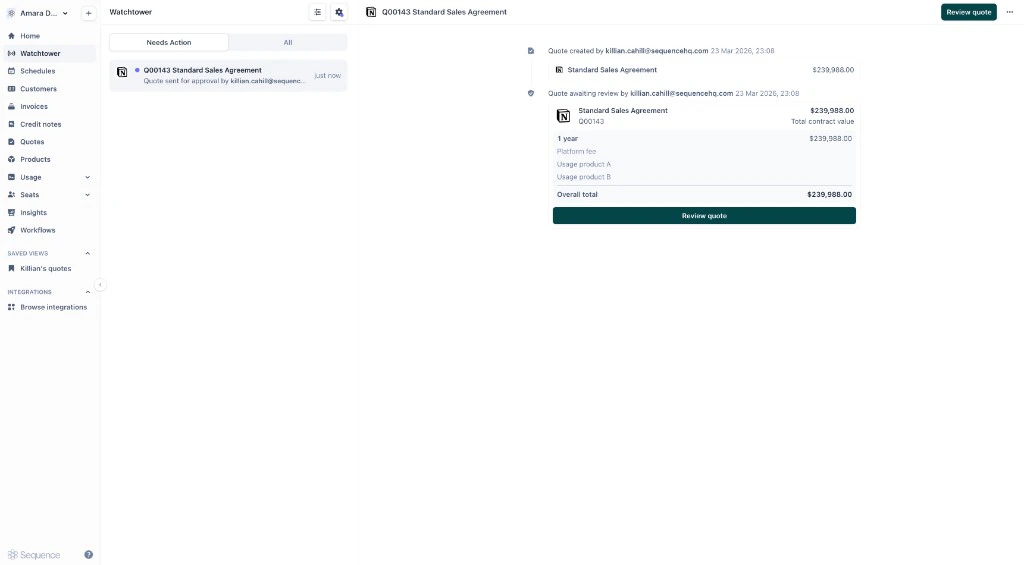 The approver opens the task in Watchtower and approves or rejects.
On approval, the workflow continues to the Action node and publishes the quote (or executes the configured action).
Every branch, approval, and action is logged in Watchtower's audit trail.
## Monitoring
All workflow runs are tracked in Watchtower. Visibility is role-based:
| Role | Contract intake runs | Quote approval runs |
| ------------------------------ | -------------------- | ------------------- |
| Admin | All runs | All runs |
| Quote owner (non-admin) | All runs | Their own |
| Approval requestor (non-admin) | All runs | Runs they requested |
| Other non-admin | All runs | Not visible |
Enable Admin mode in Watchtower to see all tasks across your workspace. You can manually override and approve tasks from there. Cancel any in-progress run from Watchtower if a quote was submitted in error or needs to restart.
## Permissions
Admin users can approve quote review tasks. Users assigned to a task can complete it; admins can complete any task. Finer-grained approver roles are planned.
## Best practices
Sketch the happy path and edge cases first. Who approves what? What happens on rejection? Use Note nodes to capture decisions.
Only one workflow runs per trigger at a time, so model variation within a single workflow using Switch branches rather than relying on several workflows for the same trigger. Publishing a second workflow for a trigger deactivates the first.
Combine conditions on a branch (e.g. total contract value more than \$50,000 and currency equals USD). Route the Else branch somewhere sensible.
Walk through each branch before going live. Confirm Approved and Rejected paths on every Review node lead somewhere meaningful.
Update the Review node when approvers change role or leave the team.
## Related
* [Watchtower](/agents/watchtower): review tasks, track runs, audit decisions
* [Contract intake agent](/agents/contract-intake): end-to-end contract processing built on Workflows
* [Payment reminders](/agents/payment-reminders): automate invoice chasing (dunning) with Reminder nodes
The approver opens the task in Watchtower and approves or rejects.
On approval, the workflow continues to the Action node and publishes the quote (or executes the configured action).
Every branch, approval, and action is logged in Watchtower's audit trail.
## Monitoring
All workflow runs are tracked in Watchtower. Visibility is role-based:
| Role | Contract intake runs | Quote approval runs |
| ------------------------------ | -------------------- | ------------------- |
| Admin | All runs | All runs |
| Quote owner (non-admin) | All runs | Their own |
| Approval requestor (non-admin) | All runs | Runs they requested |
| Other non-admin | All runs | Not visible |
Enable Admin mode in Watchtower to see all tasks across your workspace. You can manually override and approve tasks from there. Cancel any in-progress run from Watchtower if a quote was submitted in error or needs to restart.
## Permissions
Admin users can approve quote review tasks. Users assigned to a task can complete it; admins can complete any task. Finer-grained approver roles are planned.
## Best practices
Sketch the happy path and edge cases first. Who approves what? What happens on rejection? Use Note nodes to capture decisions.
Only one workflow runs per trigger at a time, so model variation within a single workflow using Switch branches rather than relying on several workflows for the same trigger. Publishing a second workflow for a trigger deactivates the first.
Combine conditions on a branch (e.g. total contract value more than \$50,000 and currency equals USD). Route the Else branch somewhere sensible.
Walk through each branch before going live. Confirm Approved and Rejected paths on every Review node lead somewhere meaningful.
Update the Review node when approvers change role or leave the team.
## Related
* [Watchtower](/agents/watchtower): review tasks, track runs, audit decisions
* [Contract intake agent](/agents/contract-intake): end-to-end contract processing built on Workflows
* [Payment reminders](/agents/payment-reminders): automate invoice chasing (dunning) with Reminder nodes