> ## Documentation Index
> Fetch the complete documentation index at: https://docs.sequencehq.com/llms.txt
> Use this file to discover all available pages before exploring further.
# Concepts
> Use phases in billing schedules to represent pre-agreed price changes, trial periods or pricing ramps
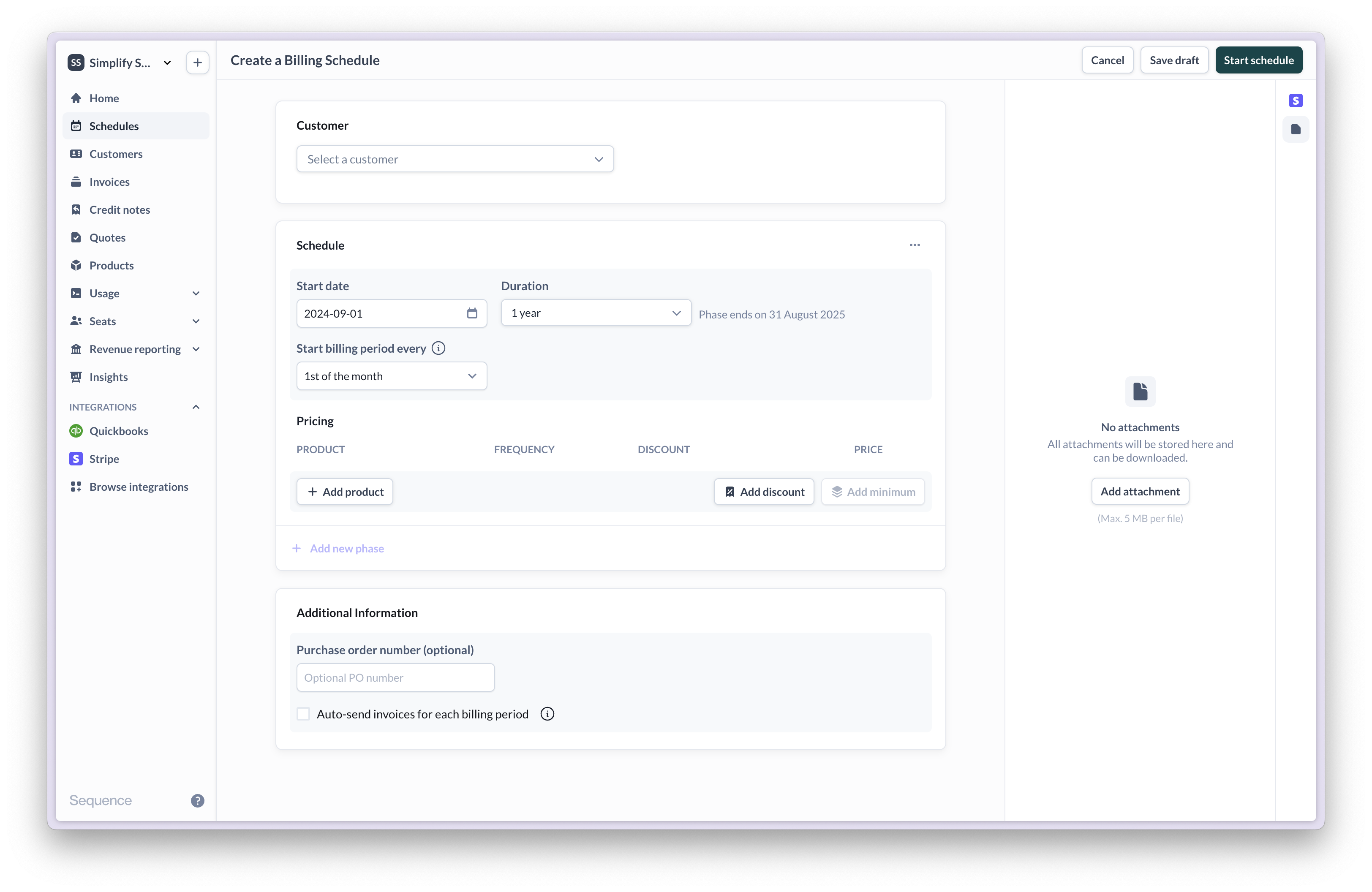
 Use schedules to automate billing and invoicing. A schedule ties one or more prices to a customer over a period of time, reflecting their contract or subscription.
 ## Understanding billing schedules
Billing schedules tie one or more prices to a customer over a period of time, reflecting their contract or subscription.
| | |
| ---------------------- | ------------------------------------------------------------------------------------------------------ |
| Start date | Date when the billing schedule begins |
| End date | Date when the billing schedule ends |
| Billing day | Aligns billing periods with a specific day of the month (useful to align contracts starting mid-month) |
| Billing period | Time interval covered by each invoice |
| Billing frequency | One-time, Monthly, Quarterly, Semi-annually, Annually |
| Billing type | In-arrears (billing period end) or in-advance (billing period start) |
| Phase | Distinct periods within a schedule with different pricing or terms |
| Partial billing period | Period where fees may be prorated |
### Lifecycle of a billing schedule
New billing schedules are created in `draft`. Once started, schedules become `active`. If the start date is in the future, the status is set to `upcoming`. The end of the last billing period marks a schedule `complete`. While a schedule is active, price changes and additional phases can be added. Once completed, a schedule cannot be edited.
The schedule start date determines when the first billing period begins. If the start date is in the past, backdated draft invoices are generated for all retrospective billing periods. A schedule with an `open-ended` duration continues billing indefinitely until manual cancellation.
### Invoice creation
Invoices are created based on the schedule's dates and the billing frequency and type of the included prices.
**In-advance billing**: Invoices generate at the start of each billing period
**In-arrears billing**: Invoices generate at the end of each billing period
A single schedule can include prices with monthly, quarterly and annual billing frequencies and different billing types to accommodate advanced contracts. When invoice creation dates for multiple prices overlap, Sequence combines them into a single invoice.
**Example**: For a schedule starting Jan 1 with both quarterly and monthly in-arrears prices, the end-of-March invoice will include line items for both prices (and so on).
## Understanding billing schedules
Billing schedules tie one or more prices to a customer over a period of time, reflecting their contract or subscription.
| | |
| ---------------------- | ------------------------------------------------------------------------------------------------------ |
| Start date | Date when the billing schedule begins |
| End date | Date when the billing schedule ends |
| Billing day | Aligns billing periods with a specific day of the month (useful to align contracts starting mid-month) |
| Billing period | Time interval covered by each invoice |
| Billing frequency | One-time, Monthly, Quarterly, Semi-annually, Annually |
| Billing type | In-arrears (billing period end) or in-advance (billing period start) |
| Phase | Distinct periods within a schedule with different pricing or terms |
| Partial billing period | Period where fees may be prorated |
### Lifecycle of a billing schedule
New billing schedules are created in `draft`. Once started, schedules become `active`. If the start date is in the future, the status is set to `upcoming`. The end of the last billing period marks a schedule `complete`. While a schedule is active, price changes and additional phases can be added. Once completed, a schedule cannot be edited.
The schedule start date determines when the first billing period begins. If the start date is in the past, backdated draft invoices are generated for all retrospective billing periods. A schedule with an `open-ended` duration continues billing indefinitely until manual cancellation.
### Invoice creation
Invoices are created based on the schedule's dates and the billing frequency and type of the included prices.
**In-advance billing**: Invoices generate at the start of each billing period
**In-arrears billing**: Invoices generate at the end of each billing period
A single schedule can include prices with monthly, quarterly and annual billing frequencies and different billing types to accommodate advanced contracts. When invoice creation dates for multiple prices overlap, Sequence combines them into a single invoice.
**Example**: For a schedule starting Jan 1 with both quarterly and monthly in-arrears prices, the end-of-March invoice will include line items for both prices (and so on).
 Some pricing models can result in an additional invoice at the end of a billing period (for example, to bill for seat overages). If that end-of-period invoice creation event coincides with other charges, Sequence may combine them into a single invoice.
When a single invoice includes charges that relate to different service periods, each line item retains its own service period (for example, for revenue recognition). In that case, the invoice-level billing period can span multiple months.
## Phases
Phases enable scheduled price changes within a single billing schedule. Each phase represents a distinct period with sequential, non-overlapping time frames.
### Phases and billing periods
When a phase transition occurs in the middle of a billing period, Sequence creates partial billing periods with prorated charges for any prices that change between phases. This makes it easy to co-term price changes or up-sells into a customer's existing contract. To avoid unexpected proration, align phase start/end dates with billing period boundaries.
Phases determine when price changes take effect but don't change *when* invoices are created (except if billing day is reset).
**Example**: A 12 month schedule includes a price billed monthly in-arrears with a first phase from Jan 1 - Apr 15 and a second phase from Apr 16 - Dec 31. The price changes from \$100 per month during the first phase to \$250 in the second phase.
Some pricing models can result in an additional invoice at the end of a billing period (for example, to bill for seat overages). If that end-of-period invoice creation event coincides with other charges, Sequence may combine them into a single invoice.
When a single invoice includes charges that relate to different service periods, each line item retains its own service period (for example, for revenue recognition). In that case, the invoice-level billing period can span multiple months.
## Phases
Phases enable scheduled price changes within a single billing schedule. Each phase represents a distinct period with sequential, non-overlapping time frames.
### Phases and billing periods
When a phase transition occurs in the middle of a billing period, Sequence creates partial billing periods with prorated charges for any prices that change between phases. This makes it easy to co-term price changes or up-sells into a customer's existing contract. To avoid unexpected proration, align phase start/end dates with billing period boundaries.
Phases determine when price changes take effect but don't change *when* invoices are created (except if billing day is reset).
**Example**: A 12 month schedule includes a price billed monthly in-arrears with a first phase from Jan 1 - Apr 15 and a second phase from Apr 16 - Dec 31. The price changes from \$100 per month during the first phase to \$250 in the second phase.
 At the end of April, an invoice with two prorated line items is created (one for each partial period): \$100 \* 15/30d + \$250 \* 15/30 = \$50 + \$125 = \$75
* **Trials**: Create a short initial phase with special pricing
* **Pricing ramps**: Set up multiple phases with gradually increasing prices
* **Renewals**: Manage contract renewals within the same schedule through new phases
* **Up-sells**: Add a phase to co-term an up-sell into a schedule
**Billing day reset**: With each phase, the billing day can optionally be reset to the start date of the phase. Resetting the billing day impacts future billing periods and when subsequent invoices are created. By default, the billing day is not reset. Once a phase starts, billing day can no longer be reset.
**Example**: A 12 month schedule with a quarterly billed price starts on Jan 1 (with 1st of the month as billing day). A new phase is added starting on May 1 with the billing day reset to May 1. The result is a partial billing period from Apr 1 - 30 and a new quarterly billing period starting on May 1. If the schedule's duration remains unchanged (12 months), the last billing period is also prorated as a result (Nov 1 - Dec 31).
At the end of April, an invoice with two prorated line items is created (one for each partial period): \$100 \* 15/30d + \$250 \* 15/30 = \$50 + \$125 = \$75
* **Trials**: Create a short initial phase with special pricing
* **Pricing ramps**: Set up multiple phases with gradually increasing prices
* **Renewals**: Manage contract renewals within the same schedule through new phases
* **Up-sells**: Add a phase to co-term an up-sell into a schedule
**Billing day reset**: With each phase, the billing day can optionally be reset to the start date of the phase. Resetting the billing day impacts future billing periods and when subsequent invoices are created. By default, the billing day is not reset. Once a phase starts, billing day can no longer be reset.
**Example**: A 12 month schedule with a quarterly billed price starts on Jan 1 (with 1st of the month as billing day). A new phase is added starting on May 1 with the billing day reset to May 1. The result is a partial billing period from Apr 1 - 30 and a new quarterly billing period starting on May 1. If the schedule's duration remains unchanged (12 months), the last billing period is also prorated as a result (Nov 1 - Dec 31).
 ### Aligning the first billing period
The billing day setting aligns billing periods to specific calendar dates (like the 1st of each month), which simplifies accounting and financial reporting. By default, billing starts on the schedule's start date with the billing day set to the first of the month. Changing the billing day setting:
1. Creates a prorated first period from the start date to the first aligned billing day. The last period is also prorated.
2. Aligns all future billing periods to the specified day
3. Applies to all prices in the schedule
**Example**: For a 12 month schedule starting Jan 15 2024 with billing day set to the 1st, the first period is from Jan 15 - 31 2024 (prorated). Subsequent billing periods cover full calendar months, starting on the 1st. The last billing period is from Jan 1 - 14 2025 (prorated).
### Aligning the first billing period
The billing day setting aligns billing periods to specific calendar dates (like the 1st of each month), which simplifies accounting and financial reporting. By default, billing starts on the schedule's start date with the billing day set to the first of the month. Changing the billing day setting:
1. Creates a prorated first period from the start date to the first aligned billing day. The last period is also prorated.
2. Aligns all future billing periods to the specified day
3. Applies to all prices in the schedule
**Example**: For a 12 month schedule starting Jan 15 2024 with billing day set to the 1st, the first period is from Jan 15 - 31 2024 (prorated). Subsequent billing periods cover full calendar months, starting on the 1st. The last billing period is from Jan 1 - 14 2025 (prorated).
 **Partial billing periods**: Occur when the actual billing period is shorter than the price's billing frequency. For example, a quarterly price in a schedule that only runs for two months results in a partial billing period.
## Change management
### Price changes
While a schedule is active, prices billed in-arrears can be changed directly, impacting the current (unbilled) billing period and subsequent periods. Prices billed in-advance require a new, separate phase for price changes. Prices in future phases can be edited without restrictions.
### Canceling an active schedule
Update the schedule end date to cancel a schedule ahead of time. If the new end date falls into an active billing period, in-arrears billed prices will be prorated and in-advance billed prices will be refunded pro-rata based on the unused time. Unbilled billing periods are unimpacted.
**Example 1**: A 12 month schedule starting Jan 1 with a monthly price billed in-arrears is canceled, with a new end date of Jun 15. On Jun 15, a final invoice for the partial billing period is created.
**Partial billing periods**: Occur when the actual billing period is shorter than the price's billing frequency. For example, a quarterly price in a schedule that only runs for two months results in a partial billing period.
## Change management
### Price changes
While a schedule is active, prices billed in-arrears can be changed directly, impacting the current (unbilled) billing period and subsequent periods. Prices billed in-advance require a new, separate phase for price changes. Prices in future phases can be edited without restrictions.
### Canceling an active schedule
Update the schedule end date to cancel a schedule ahead of time. If the new end date falls into an active billing period, in-arrears billed prices will be prorated and in-advance billed prices will be refunded pro-rata based on the unused time. Unbilled billing periods are unimpacted.
**Example 1**: A 12 month schedule starting Jan 1 with a monthly price billed in-arrears is canceled, with a new end date of Jun 15. On Jun 15, a final invoice for the partial billing period is created.
 **Example 2**: A 12 month schedule starting Jan 1 with an price billed annually in-advance is canceled, with a new end date of Jun 15. On Jun 15, a credit note refunding the unused portion is created.
 ### Modifying schedule phases
**Completed phases**: Once a phase end date has passed, it's marked as `completed` and can no longer be modified.
**Active phases**: While a phase is active (current date falls within the phase), you can adjust its end date or change pricing for upcoming billing periods (for prices billed in-arrears).
**Adding new phases**: New phases can be added at any time while a schedule is active. Each new phase automatically aligns with the end date of the preceding phase, ensuring continuous coverage.
**Phase transitions**: When adding a new phase, you can choose to either align it with a billing period boundary (to avoid pro-rated fees) or set a specific date (which may result in partial billing periods).
**Example**: A customer on a 12-month contract with a monthly billing frequency completes 6 months and then requests an upgraded plan. To implement this:
1. End the current phase on the day of the change request
2. Add a new phase with the upgraded pricing that starts immediately after
3. Set the new phase to end on the original contract end date
### Modifying schedule phases
**Completed phases**: Once a phase end date has passed, it's marked as `completed` and can no longer be modified.
**Active phases**: While a phase is active (current date falls within the phase), you can adjust its end date or change pricing for upcoming billing periods (for prices billed in-arrears).
**Adding new phases**: New phases can be added at any time while a schedule is active. Each new phase automatically aligns with the end date of the preceding phase, ensuring continuous coverage.
**Phase transitions**: When adding a new phase, you can choose to either align it with a billing period boundary (to avoid pro-rated fees) or set a specific date (which may result in partial billing periods).
**Example**: A customer on a 12-month contract with a monthly billing frequency completes 6 months and then requests an upgraded plan. To implement this:
1. End the current phase on the day of the change request
2. Add a new phase with the upgraded pricing that starts immediately after
3. Set the new phase to end on the original contract end date