> ## Documentation Index
> Fetch the complete documentation index at: https://docs.sequencehq.com/llms.txt
> Use this file to discover all available pages before exploring further.
# Credit-based billing
> Bill customers upfront for a pool of credit and draw it down against later charges
Credit-based billing charges a customer upfront for a pool of credit tied to their contract, then automatically draws it down against later charges as they're incurred. It's the billing model behind prepaid usage commitments, recurring credit packages, and contract-length allowances.
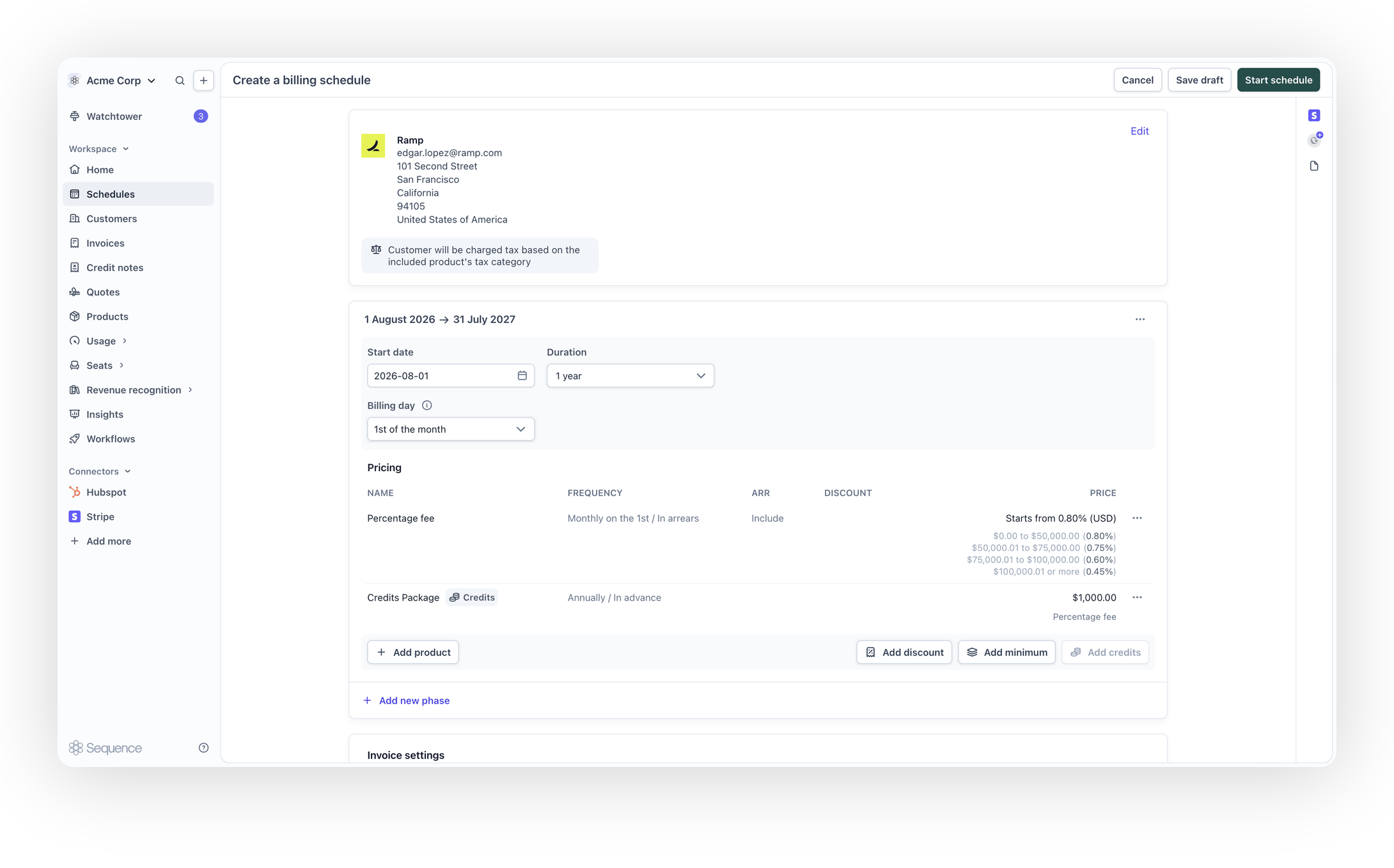 ### Bill for prepaid, recurring credit
Attach a credit grant to a phase of a customer's billing schedule
### Bill for prepaid, recurring credit
Attach a credit grant to a phase of a customer's billing schedule
Scope a grant to specific products, so it only offsets the charges it's meant to
Refresh a grant's balance monthly, quarterly, semi-annually or annually, or grant it once for the whole phase
Charge a discounted price for the credit you grant
See a grant's balance and status alongside the rest of the schedule, and how much credit an invoice has drawn down
Credit-based billing is available on request. [Contact Sequence support](mailto:support@sequencehq.com) to have it enabled for your account.
## How it works
A credit grant attached to a schedule phase behaves like a prepaid balance for that contract. A customer is invoiced for the grant, and from that point its balance draws down as they're charged for the prices it covers, whether that's usage arriving throughout the period or a fixed price on the schedule.
This is different from a [standalone credit grant](/credits/grant-credits) created directly on a customer, which isn't tied to a schedule or contract term. Use credit-based billing when the credit belongs to the contract you're configuring, for example a prepaid usage commitment, a signup allowance, or an entitlement scoped to an introductory phase. See [Credits overview](/credits/overview) for how the two approaches compare.
### Adding credit to a phase
From the billing schedule editor, open the phase you want to attach credit to and choose **Add credits**.
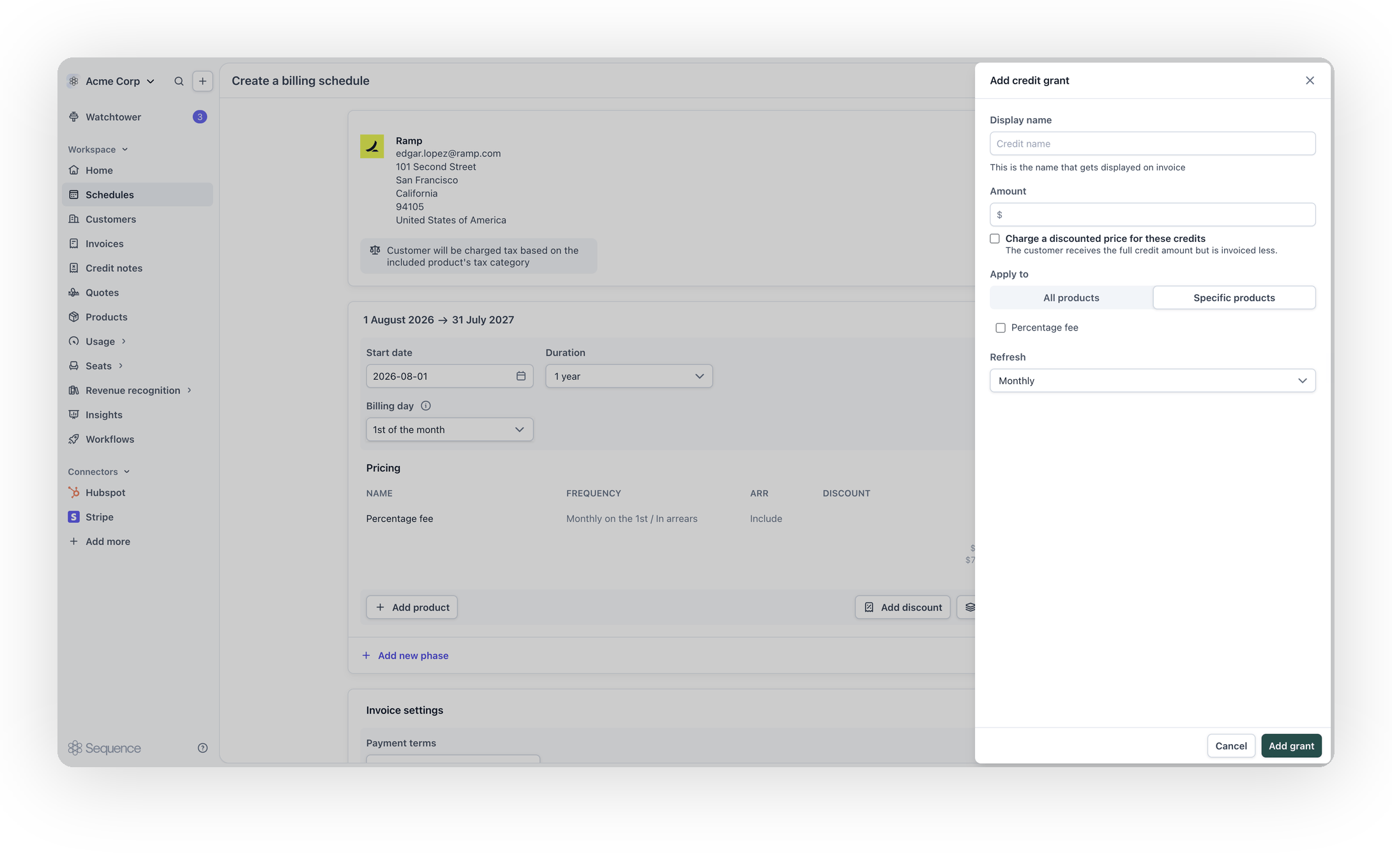 Configure the grant:
* **Display name**: appears on the invoice as the credit line item's label
* **Amount**: the amount of credit to grant
* **Charge a discounted price for these credits**: optional. The customer receives the full credit amount but is invoiced less for it, for example charging \$0.90 for every \$1 of credit granted
* **Apply to**: either every product in the phase, or specific products. Scoping a grant to specific products restricts what it can be drawn down against, so a usage allowance doesn't accidentally offset a fixed platform fee
* **Refresh**: how often the grant's balance refreshes and is re-charged, such as monthly, quarterly, semi-annually or annually
Changes to a grant are staged with the rest of the phase and applied together when you save the schedule.
Once a schedule is live, a grant's definition is locked. To change it, remove the grant and add a new one instead of editing it in place. This preserves the integrity of any balance already drawn down against it.
### Drawing down against a grant
As a customer is charged for the prices a grant covers, its balance draws down automatically. Usage-based prices draw down in real time as events arrive, so a customer's remaining balance reflects activity as it happens rather than only at the end of the billing period.
If a customer holds more than one credit grant, Sequence draws down from whichever grant would forfeit its balance soonest, so credit is never left to lapse when a later-expiring grant could have been used instead. Ties are broken by the older grant. See [Consuming credits](/credits/consuming-credits) for the full drawdown order.
### Seeing credit on invoices
Once an invoice is finalized, Sequence itemizes the credit contributed by each grant as its own row, labeled `Credit applied - {grant name}`, alongside any other totals. This appears in the invoice editor and on the customer-facing PDF, so both you and the customer can see which grants contributed to the amount due. Where credit can't be attributed to a single grant, the row is shown without a grant name rather than guessed, so the rows still sum to the total credit received.
Configure the grant:
* **Display name**: appears on the invoice as the credit line item's label
* **Amount**: the amount of credit to grant
* **Charge a discounted price for these credits**: optional. The customer receives the full credit amount but is invoiced less for it, for example charging \$0.90 for every \$1 of credit granted
* **Apply to**: either every product in the phase, or specific products. Scoping a grant to specific products restricts what it can be drawn down against, so a usage allowance doesn't accidentally offset a fixed platform fee
* **Refresh**: how often the grant's balance refreshes and is re-charged, such as monthly, quarterly, semi-annually or annually
Changes to a grant are staged with the rest of the phase and applied together when you save the schedule.
Once a schedule is live, a grant's definition is locked. To change it, remove the grant and add a new one instead of editing it in place. This preserves the integrity of any balance already drawn down against it.
### Drawing down against a grant
As a customer is charged for the prices a grant covers, its balance draws down automatically. Usage-based prices draw down in real time as events arrive, so a customer's remaining balance reflects activity as it happens rather than only at the end of the billing period.
If a customer holds more than one credit grant, Sequence draws down from whichever grant would forfeit its balance soonest, so credit is never left to lapse when a later-expiring grant could have been used instead. Ties are broken by the older grant. See [Consuming credits](/credits/consuming-credits) for the full drawdown order.
### Seeing credit on invoices
Once an invoice is finalized, Sequence itemizes the credit contributed by each grant as its own row, labeled `Credit applied - {grant name}`, alongside any other totals. This appears in the invoice editor and on the customer-facing PDF, so both you and the customer can see which grants contributed to the amount due. Where credit can't be attributed to a single grant, the row is shown without a grant name rather than guessed, so the rows still sum to the total credit received.
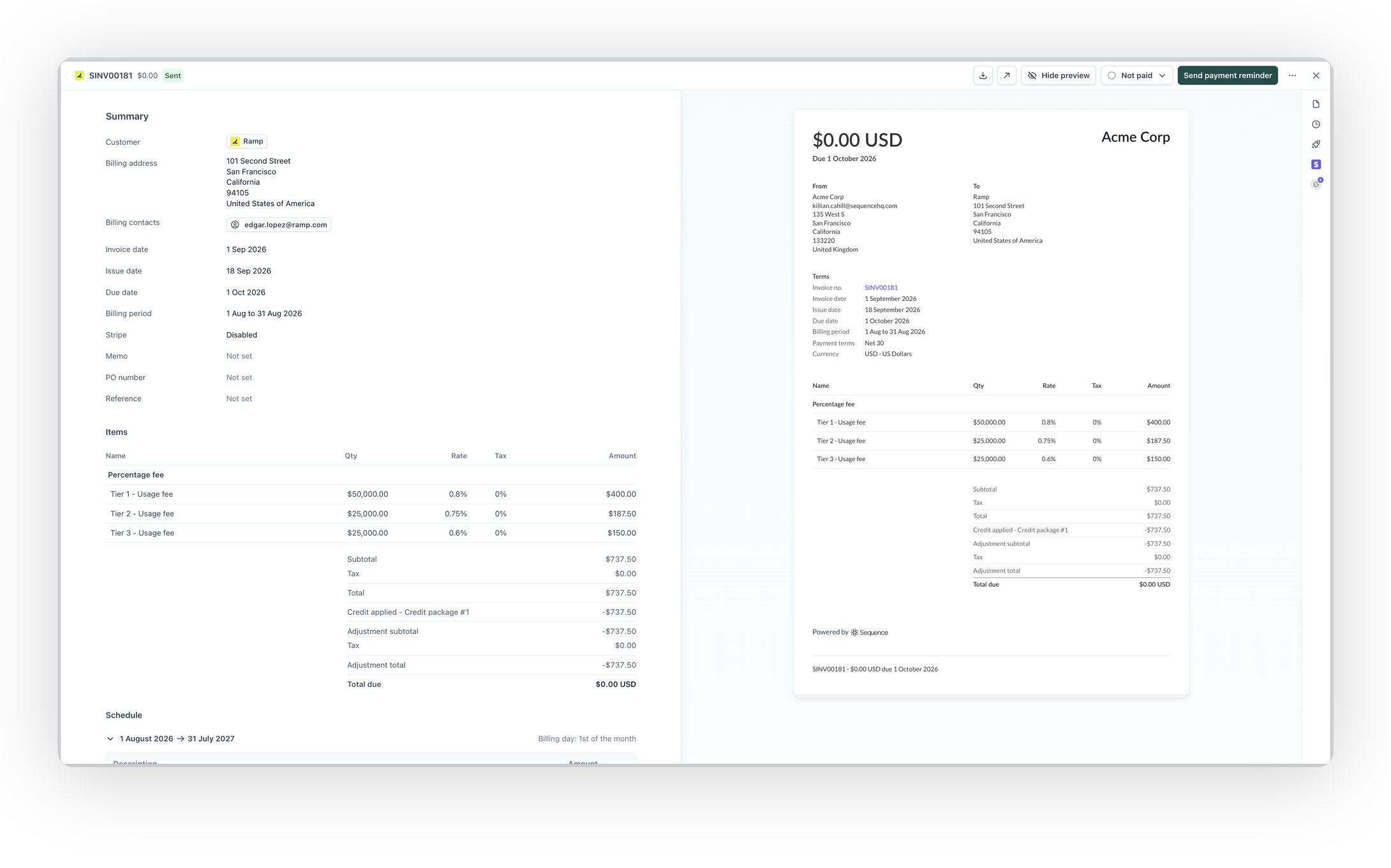 While an invoice is still a draft, Sequence shows an **Expected credit** row between the total and the total due, estimating how much credit the invoice will receive once it's finalized. This is an estimate: it can move before finalization if usage accrues or the credit ledger changes, and it's replaced by the settled *Credit applied* rows once the invoice is finalized.
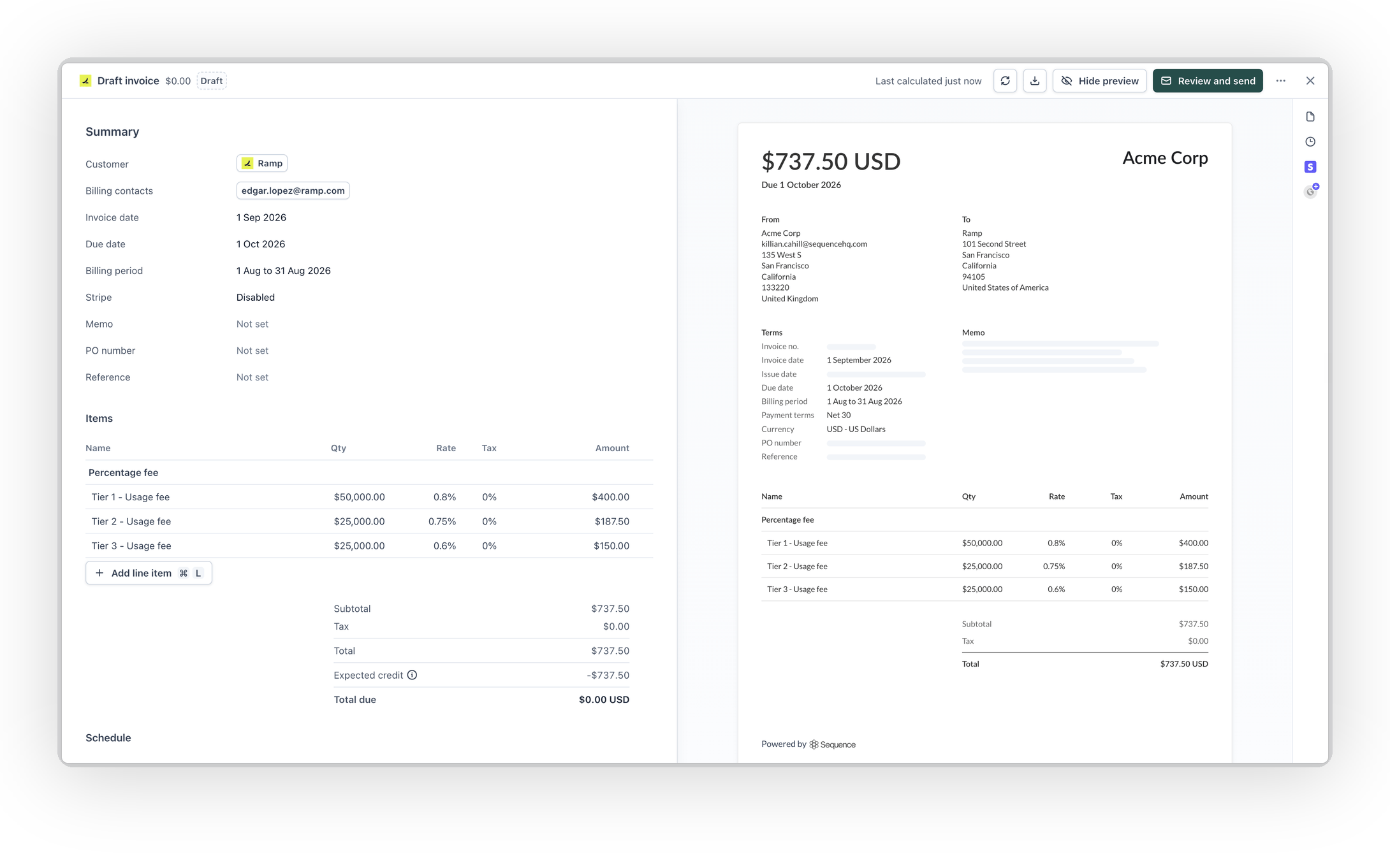 ### Grant status and balance
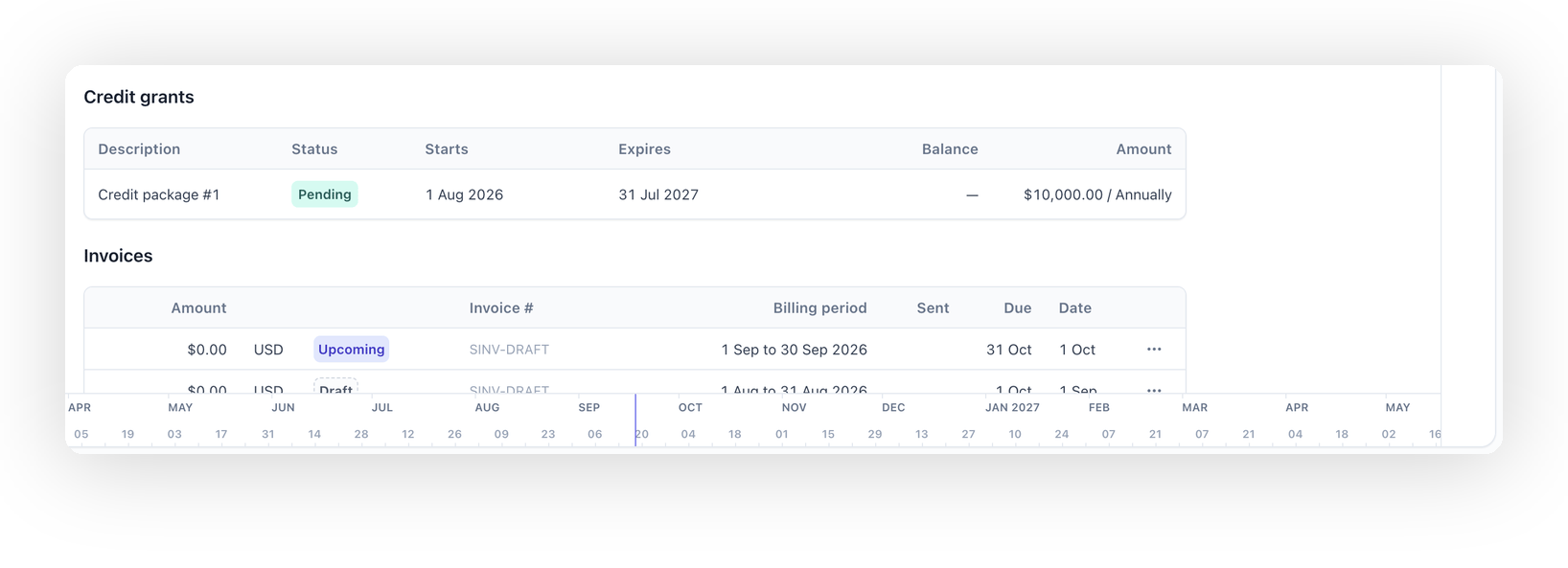
Once a schedule with credit attached is saved, its detail view shows a **Credit grants** section, with a status badge for every grant:
| Status | Meaning |
| -------- | ------------------------------------------------------------------------------------------- |
| Pending | The grant is configured but its invoice hasn't been sent yet, so it has no balance to spend |
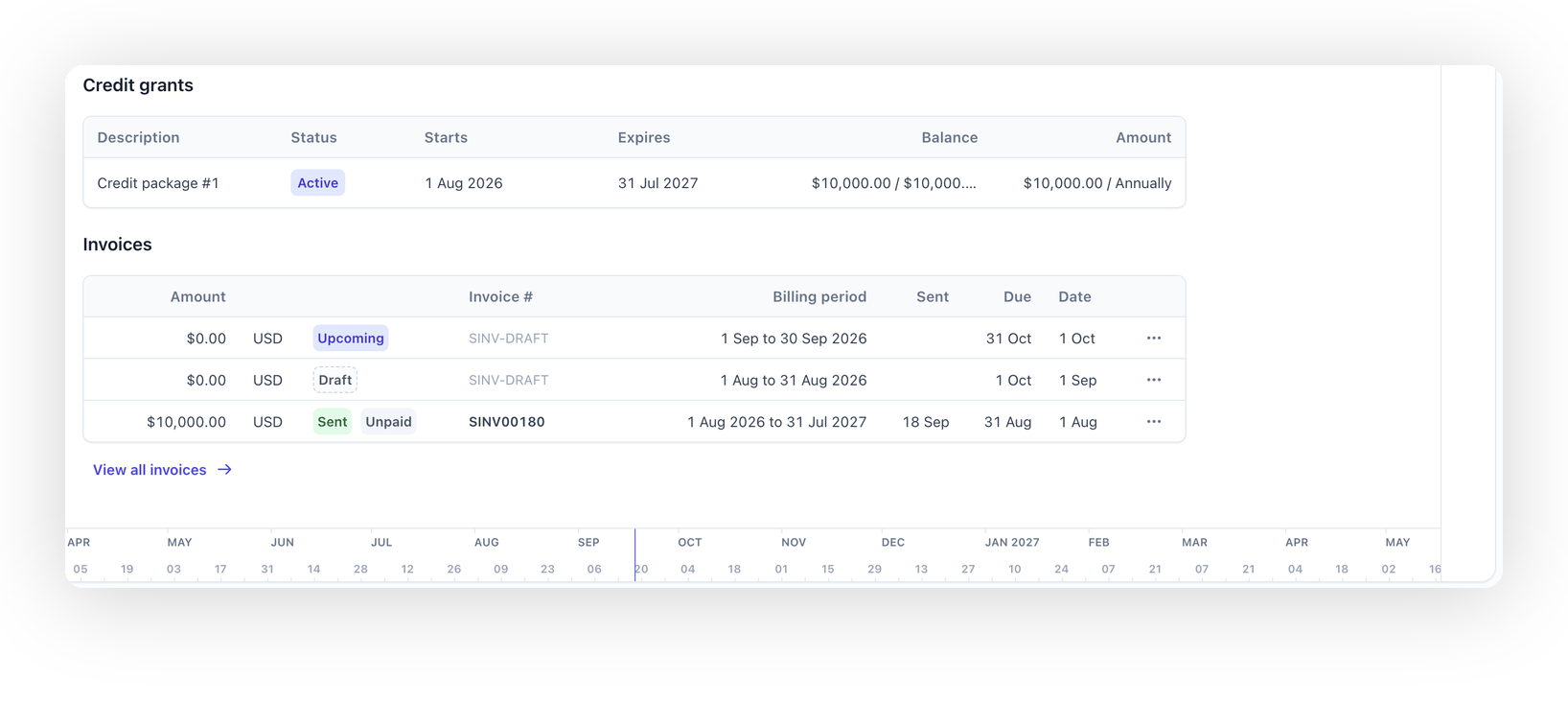
| Active | The invoice charging for the grant has been sent, and its balance is available to draw down |
| Depleted | The grant's balance has been fully drawn down |
| Expired | The grant is past its expiry, and any remaining balance has been written off |
A grant shows as Pending as soon as it's added to a saved schedule:
### Grant status and balance
Once a schedule with credit attached is saved, its detail view shows a **Credit grants** section, with a status badge for every grant:
| Status | Meaning |
| -------- | ------------------------------------------------------------------------------------------- |
| Pending | The grant is configured but its invoice hasn't been sent yet, so it has no balance to spend |
| Active | The invoice charging for the grant has been sent, and its balance is available to draw down |
| Depleted | The grant's balance has been fully drawn down |
| Expired | The grant is past its expiry, and any remaining balance has been written off |
A grant shows as Pending as soon as it's added to a saved schedule:
 It becomes Active once the invoice charging for the grant is sent, at which point its balance is available to draw down:
 ## Example
Modular sells Acme a contract that includes a prepaid API usage allowance:
* \$8,000 of credit, scoped only to the API usage price
* Refreshed, and re-charged, monthly
Modular's billing operator adds a credit grant to Acme's phase, sets the amount to \$8,000, scopes **Apply to** to the API usage price, and sets **Refresh** to monthly. Acme is invoiced \$8,000 at the start of each month, and the balance draws down automatically as their API usage arrives.
## Frequently asked questions
Once a grant's balance is fully drawn down, its status shows as Depleted and further charges against the prices it covers are billed as normal. If the grant refreshes, it releases a new balance at the start of its next period.
Any remaining balance from the previous period is written off when the grant refreshes and releases its next allowance.
The customer receives the full credit amount you grant, but Sequence invoices them for less than that face value. For example, a \$1,000 grant can be invoiced at \$900, so the customer gets \$1,000 of usable credit for \$900.
Not in place. Remove the grant and add a replacement with the new configuration. This keeps the drawdown history against the original grant intact.
## Next steps
* Learn how [billing schedule phases](/billing/billing-schedule-phases) work, since a credit grant is always attached to one
* See how credit is [drawn down and prioritized](/credits/consuming-credits) across multiple grants
* Compare with [standalone credit grants](/credits/grant-credits) for credit that isn't tied to a schedule
## Example
Modular sells Acme a contract that includes a prepaid API usage allowance:
* \$8,000 of credit, scoped only to the API usage price
* Refreshed, and re-charged, monthly
Modular's billing operator adds a credit grant to Acme's phase, sets the amount to \$8,000, scopes **Apply to** to the API usage price, and sets **Refresh** to monthly. Acme is invoiced \$8,000 at the start of each month, and the balance draws down automatically as their API usage arrives.
## Frequently asked questions
Once a grant's balance is fully drawn down, its status shows as Depleted and further charges against the prices it covers are billed as normal. If the grant refreshes, it releases a new balance at the start of its next period.
Any remaining balance from the previous period is written off when the grant refreshes and releases its next allowance.
The customer receives the full credit amount you grant, but Sequence invoices them for less than that face value. For example, a \$1,000 grant can be invoiced at \$900, so the customer gets \$1,000 of usable credit for \$900.
Not in place. Remove the grant and add a replacement with the new configuration. This keeps the drawdown history against the original grant intact.
## Next steps
* Learn how [billing schedule phases](/billing/billing-schedule-phases) work, since a credit grant is always attached to one
* See how credit is [drawn down and prioritized](/credits/consuming-credits) across multiple grants
* Compare with [standalone credit grants](/credits/grant-credits) for credit that isn't tied to a schedule