> ## Documentation Index
> Fetch the complete documentation index at: https://docs.sequencehq.com/llms.txt
> Use this file to discover all available pages before exploring further.
# Rillet
> Sync Sequence invoices in real-time and streamline your accounting process.
 **Use the Rillet integration to**:
* Keep customers in sync across Sequence and Rillet
* Sync invoices in real-time
* Automatically sync payment statuses from Rillet to Sequence
## Getting started
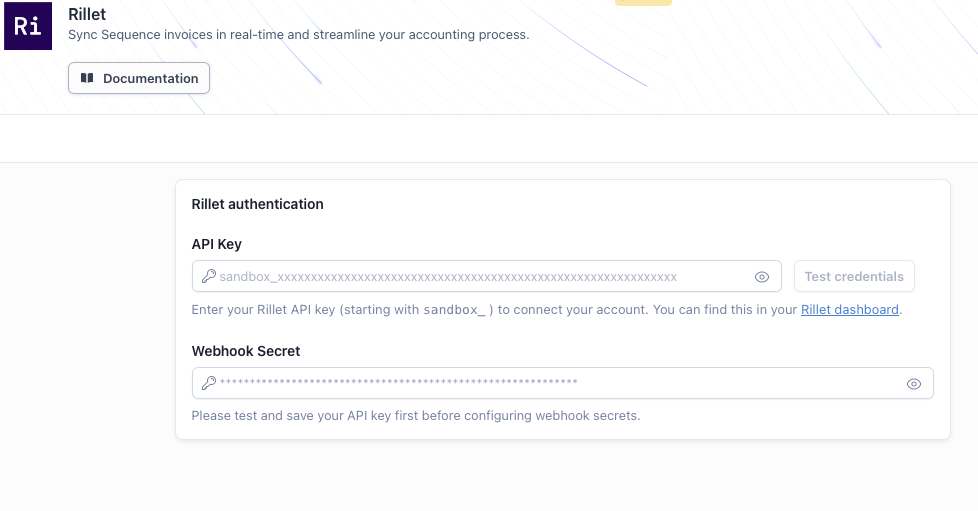
In your Rillet account, go to **Settings → API Keys** and generate a new API key for Sequence. Copy the key—you'll need it when connecting in Sequence.
Go to the Integrations tab in Sequence, select Rillet, and paste your API key to connect.
**Use the Rillet integration to**:
* Keep customers in sync across Sequence and Rillet
* Sync invoices in real-time
* Automatically sync payment statuses from Rillet to Sequence
## Getting started
In your Rillet account, go to **Settings → API Keys** and generate a new API key for Sequence. Copy the key—you'll need it when connecting in Sequence.
Go to the Integrations tab in Sequence, select Rillet, and paste your API key to connect.
 Create a webhook in Rillet so Sequence can receive invoice and payment updates:
1. Create a new webhook with **Events**: `invoice.updated`, `invoice.deleted`, and `payment.updated`
2. Set **Webhook URL** to `https://eu.sequencehq.com/api/rillet/webhooks/{sequenceAccountId}` (replace `{sequenceAccountId}` with your Sequence account ID—find it under **Settings → Account** or in the URL when logged in)
3. After creating the webhook, Rillet generates a **webhook secret** (signing token). Copy this value.
4. In Sequence, go to **Integrations → Rillet** and paste the webhook secret into the **Webhook secret** field. Click **Save**.
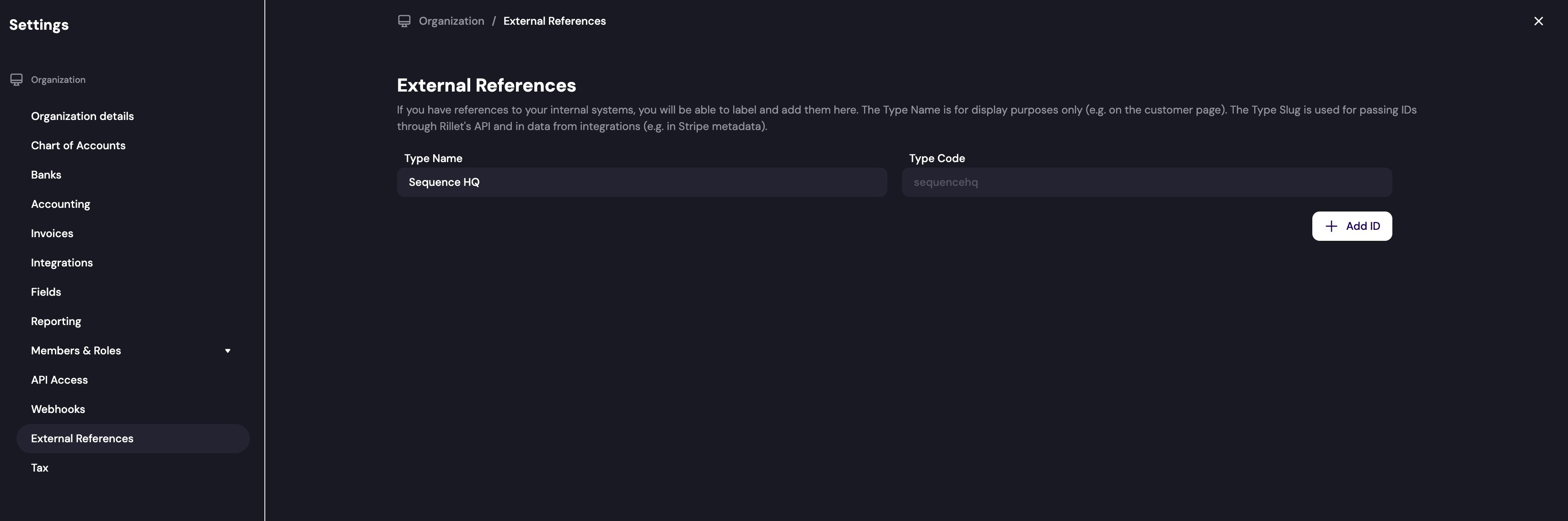
In your Rillet account, add the **sequencehq** type code for external references. This allows Rillet to correctly link and sync records between the two systems.
Create a webhook in Rillet so Sequence can receive invoice and payment updates:
1. Create a new webhook with **Events**: `invoice.updated`, `invoice.deleted`, and `payment.updated`
2. Set **Webhook URL** to `https://eu.sequencehq.com/api/rillet/webhooks/{sequenceAccountId}` (replace `{sequenceAccountId}` with your Sequence account ID—find it under **Settings → Account** or in the URL when logged in)
3. After creating the webhook, Rillet generates a **webhook secret** (signing token). Copy this value.
4. In Sequence, go to **Integrations → Rillet** and paste the webhook secret into the **Webhook secret** field. Click **Save**.
In your Rillet account, add the **sequencehq** type code for external references. This allows Rillet to correctly link and sync records between the two systems.
 Once connected, configure your integration settings in Sequence:
* **Default product**: Select a fallback product for line items that don't have a product assigned or aren't mapped to Rillet
* **Tax settings**: Configure tax codes for different customer tax statuses
If a product isn't mapped to Rillet, it will be automatically created when the invoice is synced.
## Linking customers to Rillet
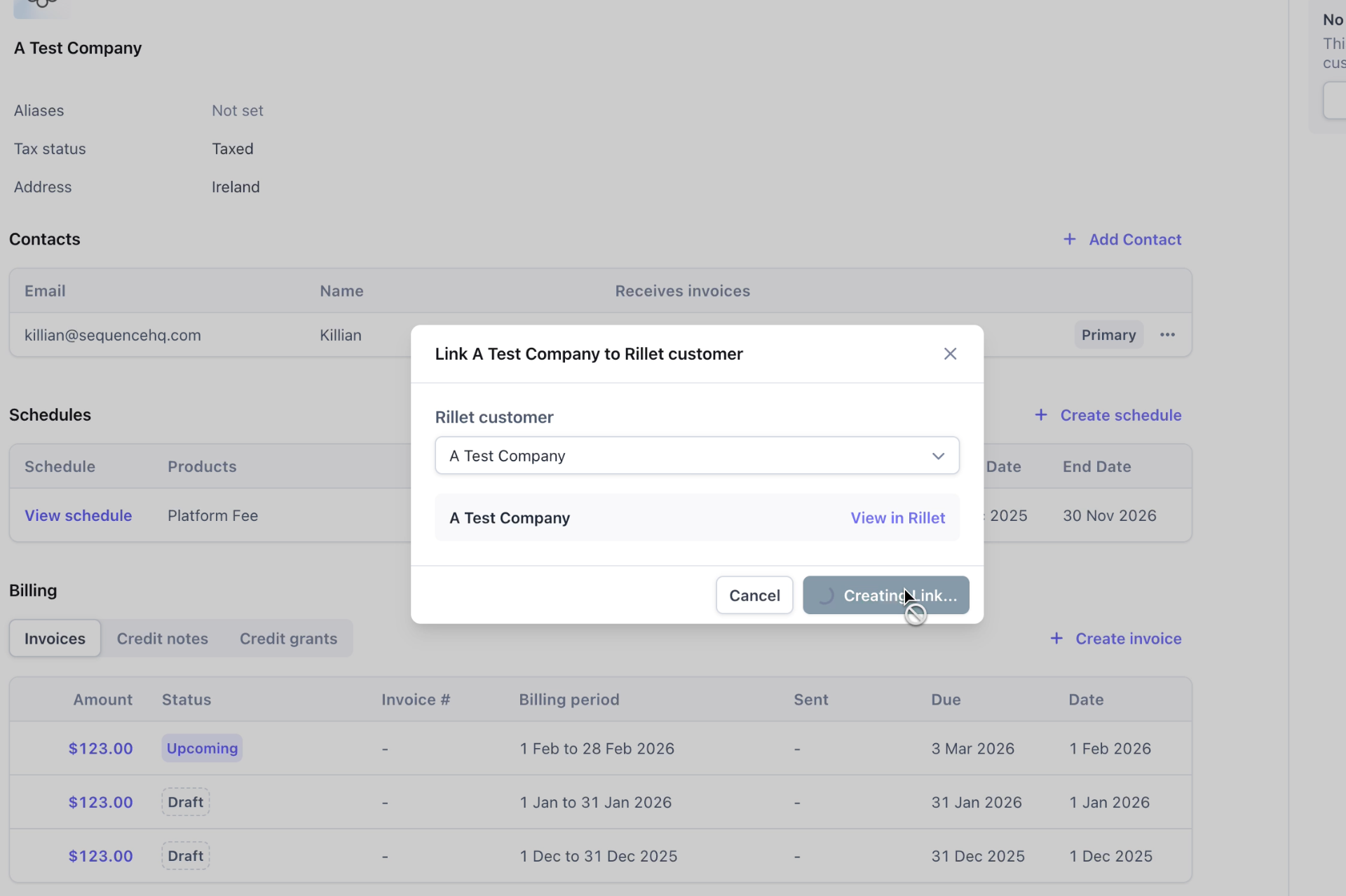
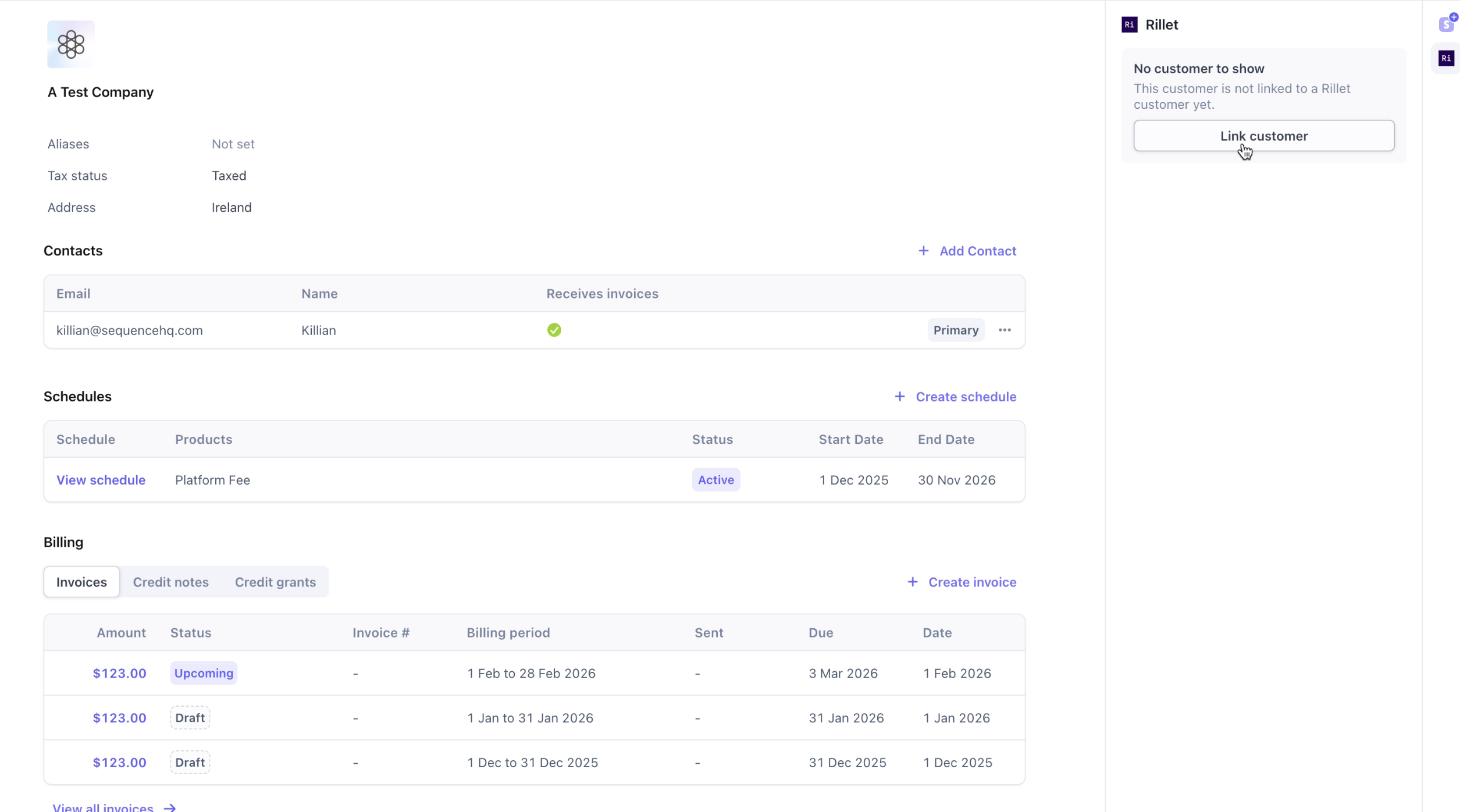
To sync invoices to Rillet, your customers need to be linked. You can link Sequence customers to existing customers in Rillet or create a new customer in Rillet directly from Sequence.
Navigate to a customer in Sequence and click "Link to Rillet" to search and select the matching Rillet customer.
Once connected, configure your integration settings in Sequence:
* **Default product**: Select a fallback product for line items that don't have a product assigned or aren't mapped to Rillet
* **Tax settings**: Configure tax codes for different customer tax statuses
If a product isn't mapped to Rillet, it will be automatically created when the invoice is synced.
## Linking customers to Rillet
To sync invoices to Rillet, your customers need to be linked. You can link Sequence customers to existing customers in Rillet or create a new customer in Rillet directly from Sequence.
Navigate to a customer in Sequence and click "Link to Rillet" to search and select the matching Rillet customer.
 If the customer doesn't exist in Rillet, click "Create new customer in Rillet" to automatically create them using the information in Sequence.
When customers are linked, a Rillet logo appears next to the customer record in Sequence for easy identification.
If the customer doesn't exist in Rillet, click "Create new customer in Rillet" to automatically create them using the information in Sequence.
When customers are linked, a Rillet logo appears next to the customer record in Sequence for easy identification.
 ## Syncing invoices
When an invoice is finalized or sent, it is automatically synced to Rillet.
To sync an invoice with Rillet, finalize or send it.
## Syncing invoices
When an invoice is finalized or sent, it is automatically synced to Rillet.
To sync an invoice with Rillet, finalize or send it.
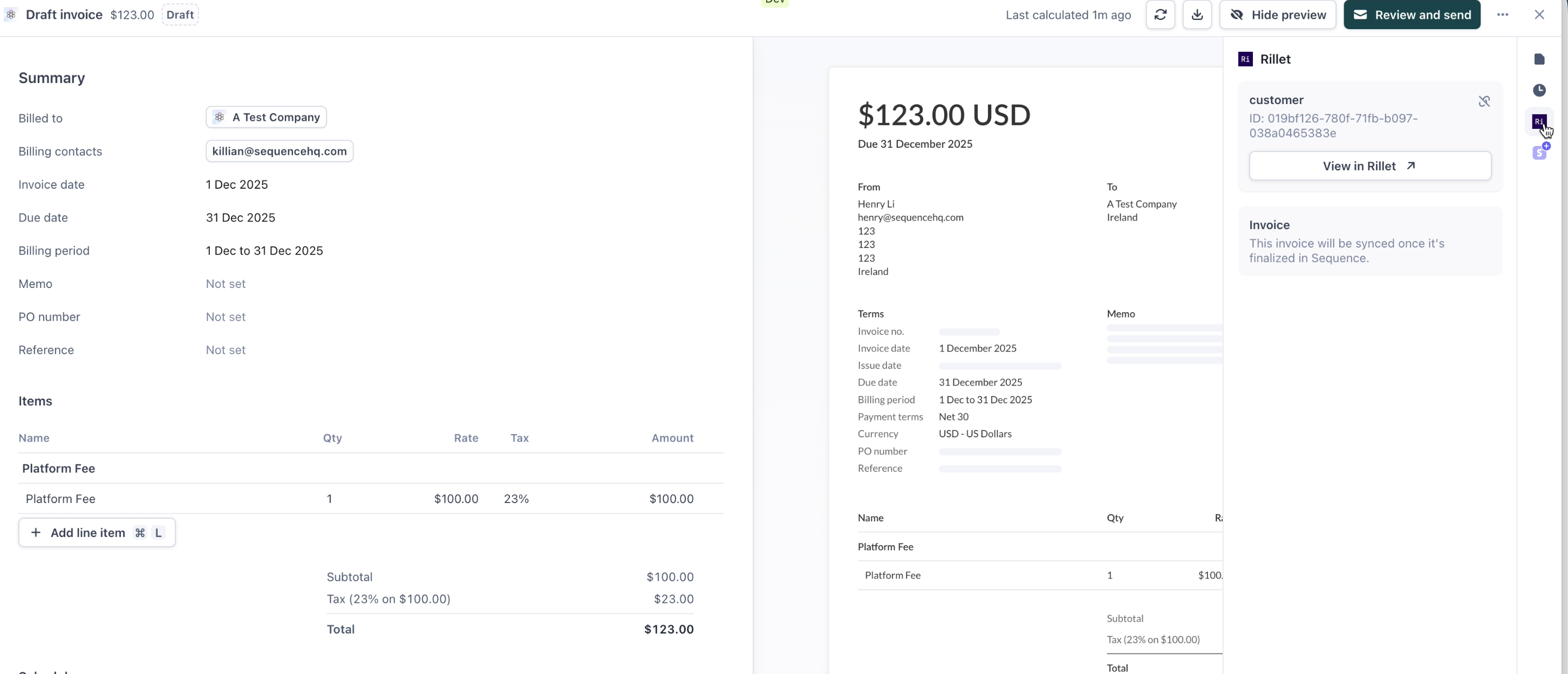
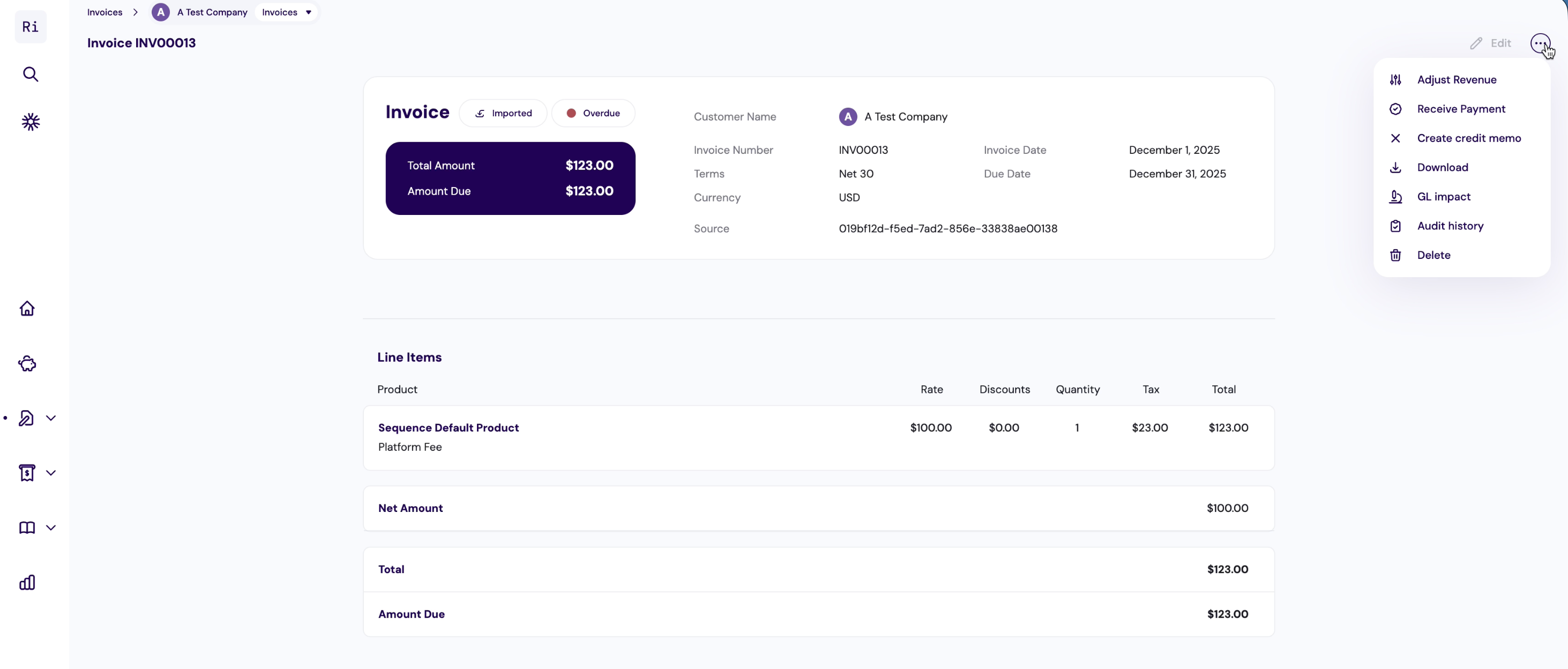 If an invoice failed to sync or if the customer was not yet linked to Rillet, you can manually re-sync the invoice from the dashboard.
## Reconciling invoices
When a payment is recorded in Rillet (e.g., wire transfer, bank payment), Rillet triggers a webhook notification and Sequence automatically marks the corresponding invoice as paid.
For invoices with a Stripe payment link, Sequence will sync the payment status from Stripe and ignore the payment status in Rillet. You need to reconcile your invoice in Rillet separately in this case.
## Linking products to Rillet
To ensure invoice line items in Rillet are correctly categorized, map Sequence products to Rillet products. You can map products from the Product Catalog in Sequence.
Select a product and click "Link to Rillet" to map it to an existing Rillet product.
If an invoice failed to sync or if the customer was not yet linked to Rillet, you can manually re-sync the invoice from the dashboard.
## Reconciling invoices
When a payment is recorded in Rillet (e.g., wire transfer, bank payment), Rillet triggers a webhook notification and Sequence automatically marks the corresponding invoice as paid.
For invoices with a Stripe payment link, Sequence will sync the payment status from Stripe and ignore the payment status in Rillet. You need to reconcile your invoice in Rillet separately in this case.
## Linking products to Rillet
To ensure invoice line items in Rillet are correctly categorized, map Sequence products to Rillet products. You can map products from the Product Catalog in Sequence.
Select a product and click "Link to Rillet" to map it to an existing Rillet product.
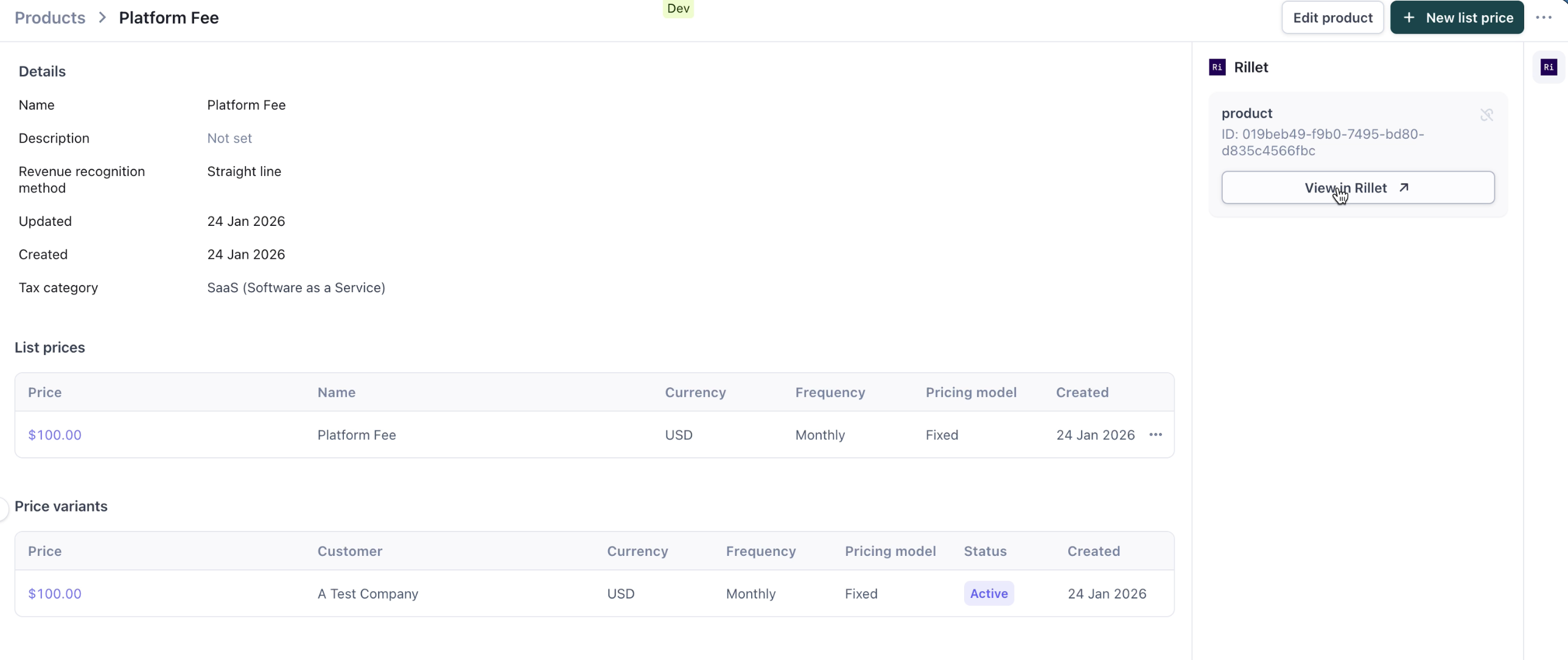
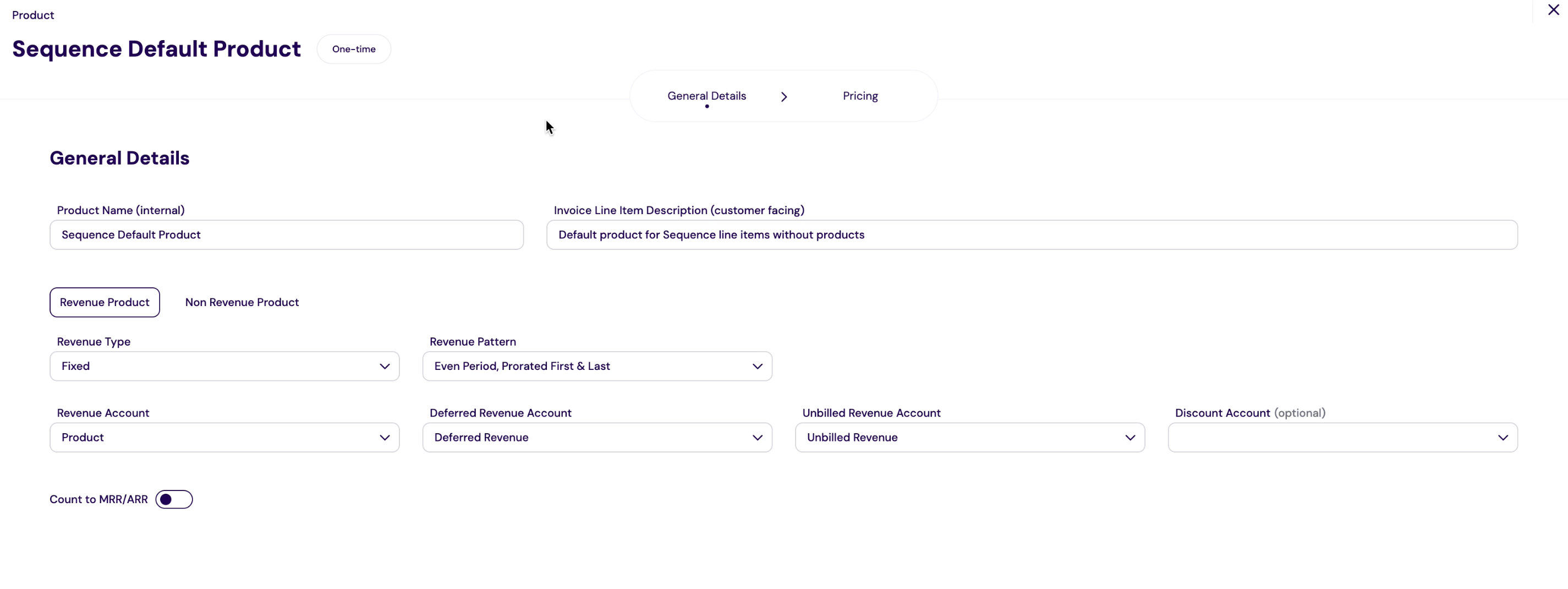 You can also create a new product in Rillet directly from Sequence with the appropriate account codes and settings.
When syncing invoices, mapped products use the mapped Rillet product. Unmapped products are automatically created in Rillet when the invoice is synced. All Sequence products are mapped as fixed products in Rillet.
## Tax codes
Rillet supports flexible tax configuration at both the customer and product level. When syncing invoices from Sequence:
* **Taxed customers**: Tax codes are applied based on product tax categories mapped in Sequence
* **Tax exempt customers**: No tax is applied to line items
* **Reverse charged customers**: Appropriate reverse charge tax codes are applied
You can configure tax code mappings in the Rillet integration settings to ensure accurate tax handling.
## Frequently asked questions
Your Sequence account ID is required for the webhook URL. Find it in Sequence under **Settings → Account**, or in the URL when you're logged in (it appears as a UUID in the URL path).
* Verify the webhook URL includes your correct Sequence account ID
* Ensure you've pasted the webhook secret from Rillet into Sequence and clicked Save
* Confirm the webhook events include `invoice.updated`, `invoice.deleted`, and `payment.updated`
* Check that the sequencehq type is added for external references in Rillet
You can view the sync status of invoices directly in Sequence. A Rillet logo will appear next to successfully synced invoices, and you can click through to view the invoice in Rillet.
If a sync fails:
1. Navigate to the invoice in Sequence
2. View the error message explaining why the sync failed
3. Address the issue (e.g., link customer, map product)
4. Click "Retry sync" to attempt the sync again
Common sync errors include:
* **Customer not linked**: Link the customer to a Rillet customer first
* **Product not mapped**: Map the product or configure a default product (products will be automatically created if not mapped)
* **Currency mismatch**: Ensure the invoice currency matches the customer's Rillet currency
* **API error**: Check your API key is valid and Rillet is accessible
* **Missing setup**: Ensure the webhook is configured and the sequencehq type is added for external references in Rillet
No. If a product isn't mapped to Rillet, it will be automatically created when the invoice is synced. However, you may want to map products in advance to ensure they use the correct account codes and settings in Rillet.
Multi-currency can be enabled by the Rillet support team in your instance. Once enabled, invoices sync in their original currency, and the currency must match the customer's configured currency in Rillet.
Payment status sync requires the webhook to be correctly configured with the `payment.updated` event. Ensure your webhook includes this event and that the webhook secret is saved in Sequence. For invoices with a Stripe payment link, Sequence syncs payment status from Stripe instead and ignores Rillet's payment status.
You can also create a new product in Rillet directly from Sequence with the appropriate account codes and settings.
When syncing invoices, mapped products use the mapped Rillet product. Unmapped products are automatically created in Rillet when the invoice is synced. All Sequence products are mapped as fixed products in Rillet.
## Tax codes
Rillet supports flexible tax configuration at both the customer and product level. When syncing invoices from Sequence:
* **Taxed customers**: Tax codes are applied based on product tax categories mapped in Sequence
* **Tax exempt customers**: No tax is applied to line items
* **Reverse charged customers**: Appropriate reverse charge tax codes are applied
You can configure tax code mappings in the Rillet integration settings to ensure accurate tax handling.
## Frequently asked questions
Your Sequence account ID is required for the webhook URL. Find it in Sequence under **Settings → Account**, or in the URL when you're logged in (it appears as a UUID in the URL path).
* Verify the webhook URL includes your correct Sequence account ID
* Ensure you've pasted the webhook secret from Rillet into Sequence and clicked Save
* Confirm the webhook events include `invoice.updated`, `invoice.deleted`, and `payment.updated`
* Check that the sequencehq type is added for external references in Rillet
You can view the sync status of invoices directly in Sequence. A Rillet logo will appear next to successfully synced invoices, and you can click through to view the invoice in Rillet.
If a sync fails:
1. Navigate to the invoice in Sequence
2. View the error message explaining why the sync failed
3. Address the issue (e.g., link customer, map product)
4. Click "Retry sync" to attempt the sync again
Common sync errors include:
* **Customer not linked**: Link the customer to a Rillet customer first
* **Product not mapped**: Map the product or configure a default product (products will be automatically created if not mapped)
* **Currency mismatch**: Ensure the invoice currency matches the customer's Rillet currency
* **API error**: Check your API key is valid and Rillet is accessible
* **Missing setup**: Ensure the webhook is configured and the sequencehq type is added for external references in Rillet
No. If a product isn't mapped to Rillet, it will be automatically created when the invoice is synced. However, you may want to map products in advance to ensure they use the correct account codes and settings in Rillet.
Multi-currency can be enabled by the Rillet support team in your instance. Once enabled, invoices sync in their original currency, and the currency must match the customer's configured currency in Rillet.
Payment status sync requires the webhook to be correctly configured with the `payment.updated` event. Ensure your webhook includes this event and that the webhook secret is saved in Sequence. For invoices with a Stripe payment link, Sequence syncs payment status from Stripe instead and ignores Rillet's payment status.