> ## Documentation Index
> Fetch the complete documentation index at: https://docs.sequencehq.com/llms.txt
> Use this file to discover all available pages before exploring further.
# Journal reports
> Review, export, and integrate revenue recognition journals
Journal reports export every recognition movement Sequence has generated, in formats designed for direct import into Xero, QuickBooks, NetSuite, or a generic GL system.
## Monthly journal reports
For each month, Sequence assembles a summary that combines all the revenue subledger journals for the period.
By default, the report shows one journal per **customer, product, and invoice** combination. On a monthly invoice cadence, this maps roughly to one journal per invoice line item group.
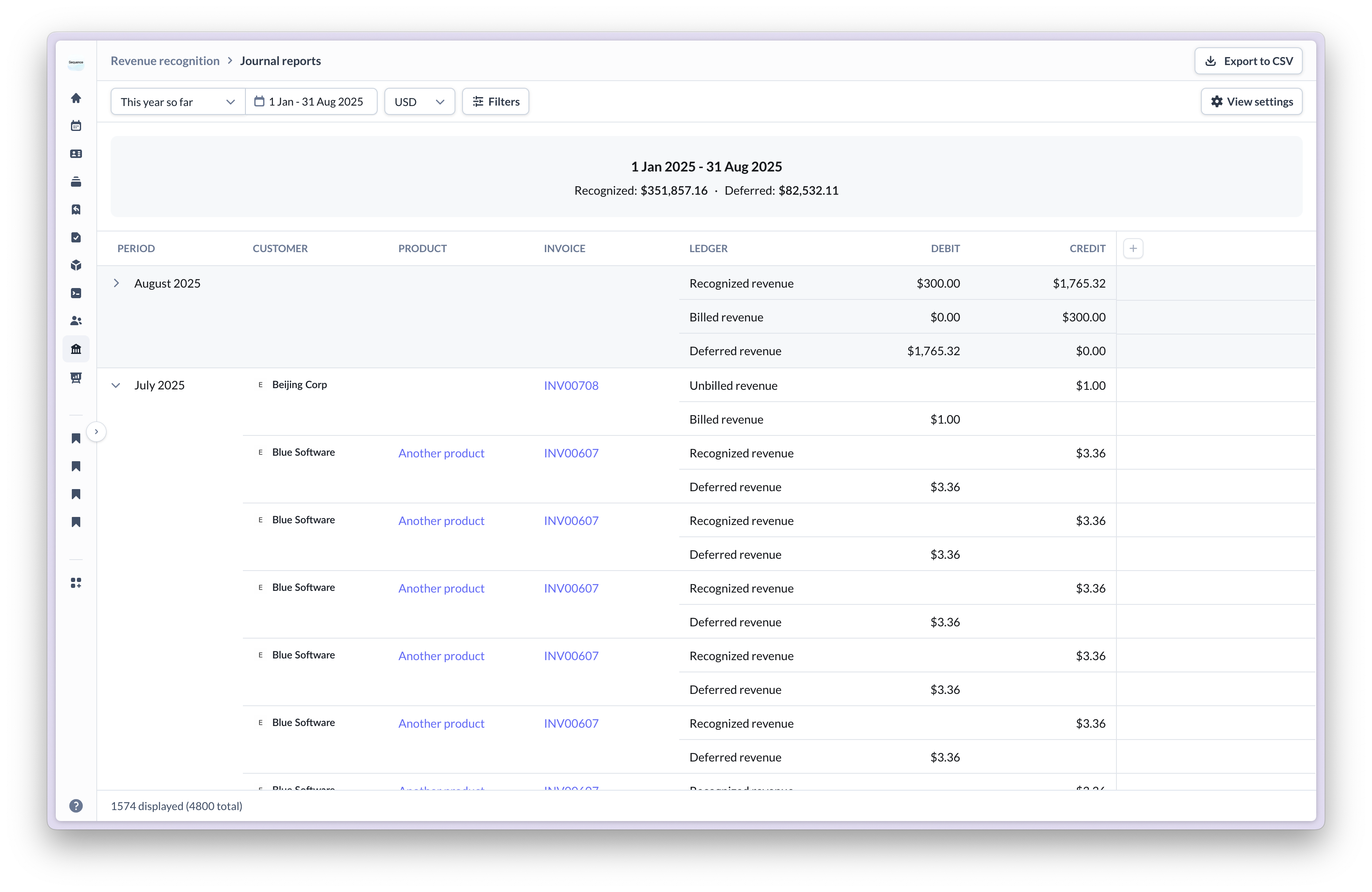 The report includes daily journal entries. Once exported, you can group them into monthly buckets or keep the daily granularity, depending on your accounting system's preference.
### Journal details
Click into any journal to see the underlying daily entries Sequence generated.
The report includes daily journal entries. Once exported, you can group them into monthly buckets or keep the daily granularity, depending on your accounting system's preference.
### Journal details
Click into any journal to see the underlying daily entries Sequence generated.
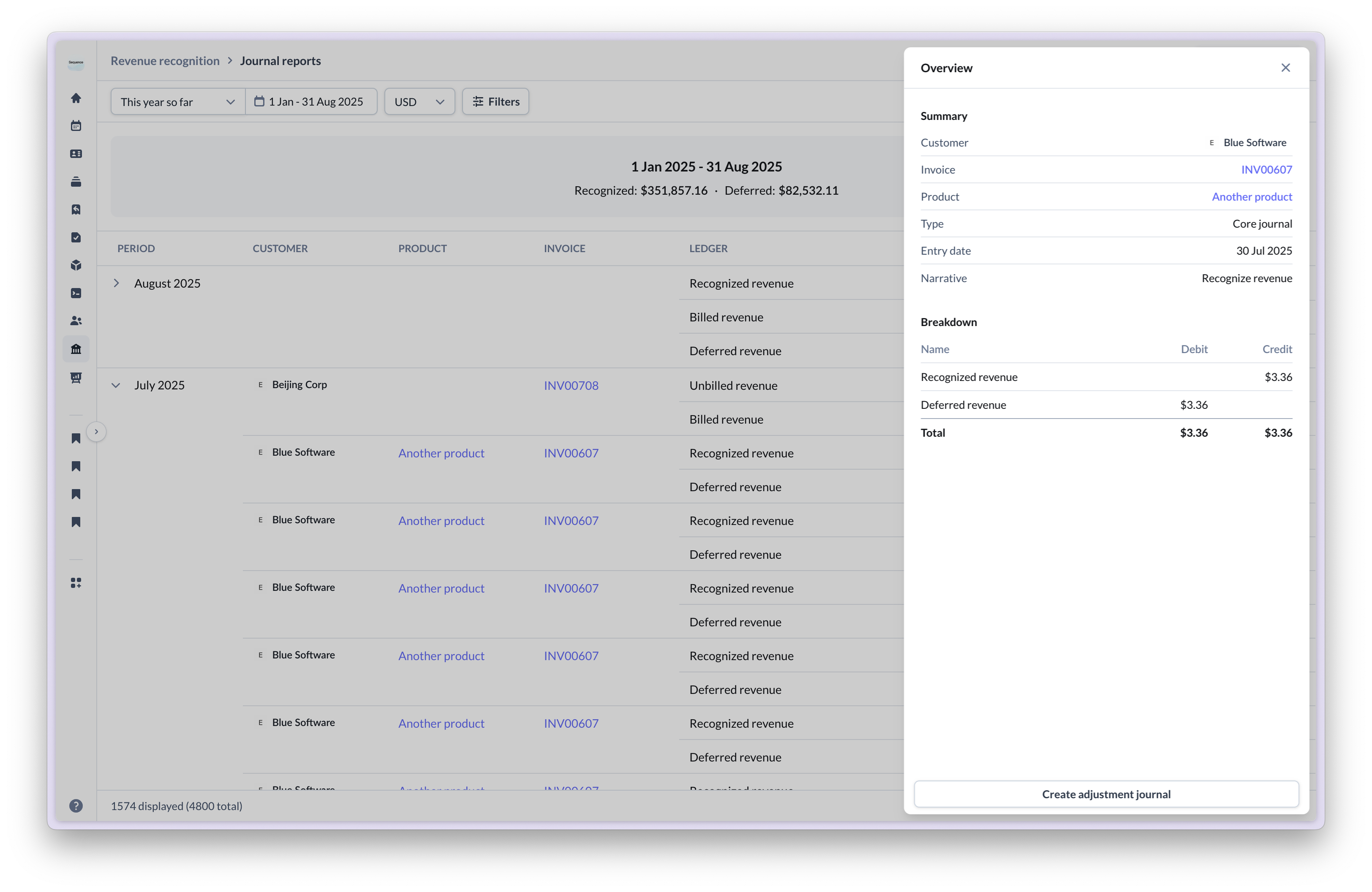 The detailed view shows:
* Daily recognition amounts.
* The source transaction (invoice, billing schedule, credit note, or standalone manual journal).
* Account movements (deferred to recognized, billed to deferred, and so on).
* The recognition method that produced the entry.
* The narrative, including any note Sequence added when a posting date was shifted to respect an account period lock.
### Source field
Every journal carries a **Source** that explains where the entry originated:
| Source | Description |
| ---------------- | ------------------------------------------------------------------------------- |
| Invoice | Recognition driven by an issued invoice. |
| Billing schedule | Recognition driven by a billing schedule (used for unbilled-revenue scenarios). |
| Credit note | Reversal or rebuild from a credit note. |
| Standalone | A manual journal posted via the dashboard, not tied to a Sequence document. |
The Source field is available on the API response and as a filter in the dashboard, so reconciliation by source is straightforward.
## Filters
The report supports the filters most relevant to month-end close:
* **Date range**: from / to (inclusive).
* **As of date**: what the journal report looked like as of a specific historical date.
* **Currency**: one currency per report, since each ledger is currency-scoped.
* **Journal type**: system-generated or manual.
* **Customer, product, invoice, or credit note**: scoped subsets for targeted reconciliation.
* **Exclude fully recognized**: hides journals whose recognition is fully complete by the as-of date.
## Export formats
Sequence supports four export formats. Pick the one that matches your downstream system.
A general-purpose CSV format suitable for any GL system. Columns:
| Column | Notes |
| -------------------------- | ------------------------------------------------------------------------------------------------------- |
| `Journal Number` | Sequence-generated identifier. |
| `Date` | ISO 8601 date. |
| `Narrative` | Explanation of the journal, including lock-shift notes. |
| `Product name` | Product associated with the journal. |
| `Customer ID` | Sequence customer ID. |
| `Customer name` | Customer's legal name. |
| `Direction` | `DEBIT` or `CREDIT`. |
| `Ledger account name` | E.g., Billed Revenue, Deferred Revenue, Recognized Revenue. |
| `Amount` | Positive amount; the sign comes from the Direction column. |
| `Invoice ID` | Source invoice ID, if applicable. |
| `Invoice number` | Invoice number, if applicable. |
| `Xero ledger account code` | Included only when the Xero integration is enabled. Resolved per-entry from the product's Xero mapping. |
Formatted as a Xero **Manual Journals** import file, so each journal can be loaded into Xero without further transformation. Columns:
| Column | Notes |
| --------------------------------- | ---------------------------------------------------------------------------------------------------------------------------------------------------------- |
| `*Narration` | Journal narrative (required by Xero). |
| `*Date` | ISO 8601 date (required). |
| `Description` | Free-text description. |
| `*AccountCode` | The mapped Xero ledger account code for the entry. |
| `*TaxRate` | Tax rate (left blank for revenue journals). |
| `*Amount` | Signed amount; sign respects Xero's normal-balance convention. Amounts are rounded to two decimal places, with trailing zeroes stripped where appropriate. |
| `TrackingName1 / TrackingOption1` | Tracking categories. |
| `TrackingName2 / TrackingOption2` | Second tracking dimension. |
See [Xero integration](/integrations/xero) for ledger account setup.
A CSV laid out for QuickBooks Online's journal entry import, so each journal loads without further transformation.
A CSV laid out for NetSuite's journal entry import. The column layout differs from the QuickBooks format to match NetSuite's import template.
## Sign convention
Sequence's internal ledger uses an explicit `Direction` (Debit or Credit). When generating the Xero export, the amount is signed according to each Xero account's **normal balance**:
* Debiting a debit-normal account produces a positive amount.
* Crediting a credit-normal account produces a positive amount.
* Crediting a debit-normal account produces a negative amount.
* Debiting a credit-normal account produces a negative amount.
This mirrors what Xero expects on import, so journals load without manual sign correction.
## Async download flow
For larger reports, generation runs in the background:
Pick the format (Sequence, Xero, QuickBooks, or NetSuite) and the filters you want, then start the export.
Sequence begins assembling the report. The dashboard shows a "Generating…" state. You can navigate away from the page while this runs.
When the report is ready, Sequence sends an email containing a signed link to download the file. The link is also surfaced inside the dashboard.
Click the link to download the CSV directly. The signed URL has a limited lifetime, so download soon after the email arrives.
The streaming endpoint remains available for small reports that complete in time, but the async flow is the recommended path for monthly close exports on accounts of any meaningful size. How long generation takes depends on the volume of journals in the report.
### Spreadsheet row limits
Large date ranges can produce CSVs that exceed Excel and Google Sheets' row limits (\~1M rows). A full calendar year of daily journals on a high-volume account can hit this.
If you hit the limit:
* Narrow the export to a quarter or month at a time.
* Aggregate to monthly granularity before exporting.
* Load the CSV into a database or BI tool (DuckDB, BigQuery, ClickHouse) for analysis.
## Integration workflow
Read the journals in Sequence for accuracy. Pay particular attention to credit note reversals and any entries with lock-shift narratives.
Pick the format matching your GL: Xero, QuickBooks, NetSuite, or the generic Sequence CSV.
If your GL prefers monthly totals over daily granularity, group entries in a spreadsheet before import.
Use your accounting system's journal import feature.
Tie exported amounts back to ledger balances. The deferred revenue and waterfall reports reconcile to the journal report. See [Deferred revenue](/revenue-recognition/deferred-revenue) for the reconciliation guide.
## Manual adjustments
Any Sequence-generated journal can be selected for manual adjustment, to correct errors or recognize revenue not captured automatically.
The detailed view shows:
* Daily recognition amounts.
* The source transaction (invoice, billing schedule, credit note, or standalone manual journal).
* Account movements (deferred to recognized, billed to deferred, and so on).
* The recognition method that produced the entry.
* The narrative, including any note Sequence added when a posting date was shifted to respect an account period lock.
### Source field
Every journal carries a **Source** that explains where the entry originated:
| Source | Description |
| ---------------- | ------------------------------------------------------------------------------- |
| Invoice | Recognition driven by an issued invoice. |
| Billing schedule | Recognition driven by a billing schedule (used for unbilled-revenue scenarios). |
| Credit note | Reversal or rebuild from a credit note. |
| Standalone | A manual journal posted via the dashboard, not tied to a Sequence document. |
The Source field is available on the API response and as a filter in the dashboard, so reconciliation by source is straightforward.
## Filters
The report supports the filters most relevant to month-end close:
* **Date range**: from / to (inclusive).
* **As of date**: what the journal report looked like as of a specific historical date.
* **Currency**: one currency per report, since each ledger is currency-scoped.
* **Journal type**: system-generated or manual.
* **Customer, product, invoice, or credit note**: scoped subsets for targeted reconciliation.
* **Exclude fully recognized**: hides journals whose recognition is fully complete by the as-of date.
## Export formats
Sequence supports four export formats. Pick the one that matches your downstream system.
A general-purpose CSV format suitable for any GL system. Columns:
| Column | Notes |
| -------------------------- | ------------------------------------------------------------------------------------------------------- |
| `Journal Number` | Sequence-generated identifier. |
| `Date` | ISO 8601 date. |
| `Narrative` | Explanation of the journal, including lock-shift notes. |
| `Product name` | Product associated with the journal. |
| `Customer ID` | Sequence customer ID. |
| `Customer name` | Customer's legal name. |
| `Direction` | `DEBIT` or `CREDIT`. |
| `Ledger account name` | E.g., Billed Revenue, Deferred Revenue, Recognized Revenue. |
| `Amount` | Positive amount; the sign comes from the Direction column. |
| `Invoice ID` | Source invoice ID, if applicable. |
| `Invoice number` | Invoice number, if applicable. |
| `Xero ledger account code` | Included only when the Xero integration is enabled. Resolved per-entry from the product's Xero mapping. |
Formatted as a Xero **Manual Journals** import file, so each journal can be loaded into Xero without further transformation. Columns:
| Column | Notes |
| --------------------------------- | ---------------------------------------------------------------------------------------------------------------------------------------------------------- |
| `*Narration` | Journal narrative (required by Xero). |
| `*Date` | ISO 8601 date (required). |
| `Description` | Free-text description. |
| `*AccountCode` | The mapped Xero ledger account code for the entry. |
| `*TaxRate` | Tax rate (left blank for revenue journals). |
| `*Amount` | Signed amount; sign respects Xero's normal-balance convention. Amounts are rounded to two decimal places, with trailing zeroes stripped where appropriate. |
| `TrackingName1 / TrackingOption1` | Tracking categories. |
| `TrackingName2 / TrackingOption2` | Second tracking dimension. |
See [Xero integration](/integrations/xero) for ledger account setup.
A CSV laid out for QuickBooks Online's journal entry import, so each journal loads without further transformation.
A CSV laid out for NetSuite's journal entry import. The column layout differs from the QuickBooks format to match NetSuite's import template.
## Sign convention
Sequence's internal ledger uses an explicit `Direction` (Debit or Credit). When generating the Xero export, the amount is signed according to each Xero account's **normal balance**:
* Debiting a debit-normal account produces a positive amount.
* Crediting a credit-normal account produces a positive amount.
* Crediting a debit-normal account produces a negative amount.
* Debiting a credit-normal account produces a negative amount.
This mirrors what Xero expects on import, so journals load without manual sign correction.
## Async download flow
For larger reports, generation runs in the background:
Pick the format (Sequence, Xero, QuickBooks, or NetSuite) and the filters you want, then start the export.
Sequence begins assembling the report. The dashboard shows a "Generating…" state. You can navigate away from the page while this runs.
When the report is ready, Sequence sends an email containing a signed link to download the file. The link is also surfaced inside the dashboard.
Click the link to download the CSV directly. The signed URL has a limited lifetime, so download soon after the email arrives.
The streaming endpoint remains available for small reports that complete in time, but the async flow is the recommended path for monthly close exports on accounts of any meaningful size. How long generation takes depends on the volume of journals in the report.
### Spreadsheet row limits
Large date ranges can produce CSVs that exceed Excel and Google Sheets' row limits (\~1M rows). A full calendar year of daily journals on a high-volume account can hit this.
If you hit the limit:
* Narrow the export to a quarter or month at a time.
* Aggregate to monthly granularity before exporting.
* Load the CSV into a database or BI tool (DuckDB, BigQuery, ClickHouse) for analysis.
## Integration workflow
Read the journals in Sequence for accuracy. Pay particular attention to credit note reversals and any entries with lock-shift narratives.
Pick the format matching your GL: Xero, QuickBooks, NetSuite, or the generic Sequence CSV.
If your GL prefers monthly totals over daily granularity, group entries in a spreadsheet before import.
Use your accounting system's journal import feature.
Tie exported amounts back to ledger balances. The deferred revenue and waterfall reports reconcile to the journal report. See [Deferred revenue](/revenue-recognition/deferred-revenue) for the reconciliation guide.
## Manual adjustments
Any Sequence-generated journal can be selected for manual adjustment, to correct errors or recognize revenue not captured automatically.
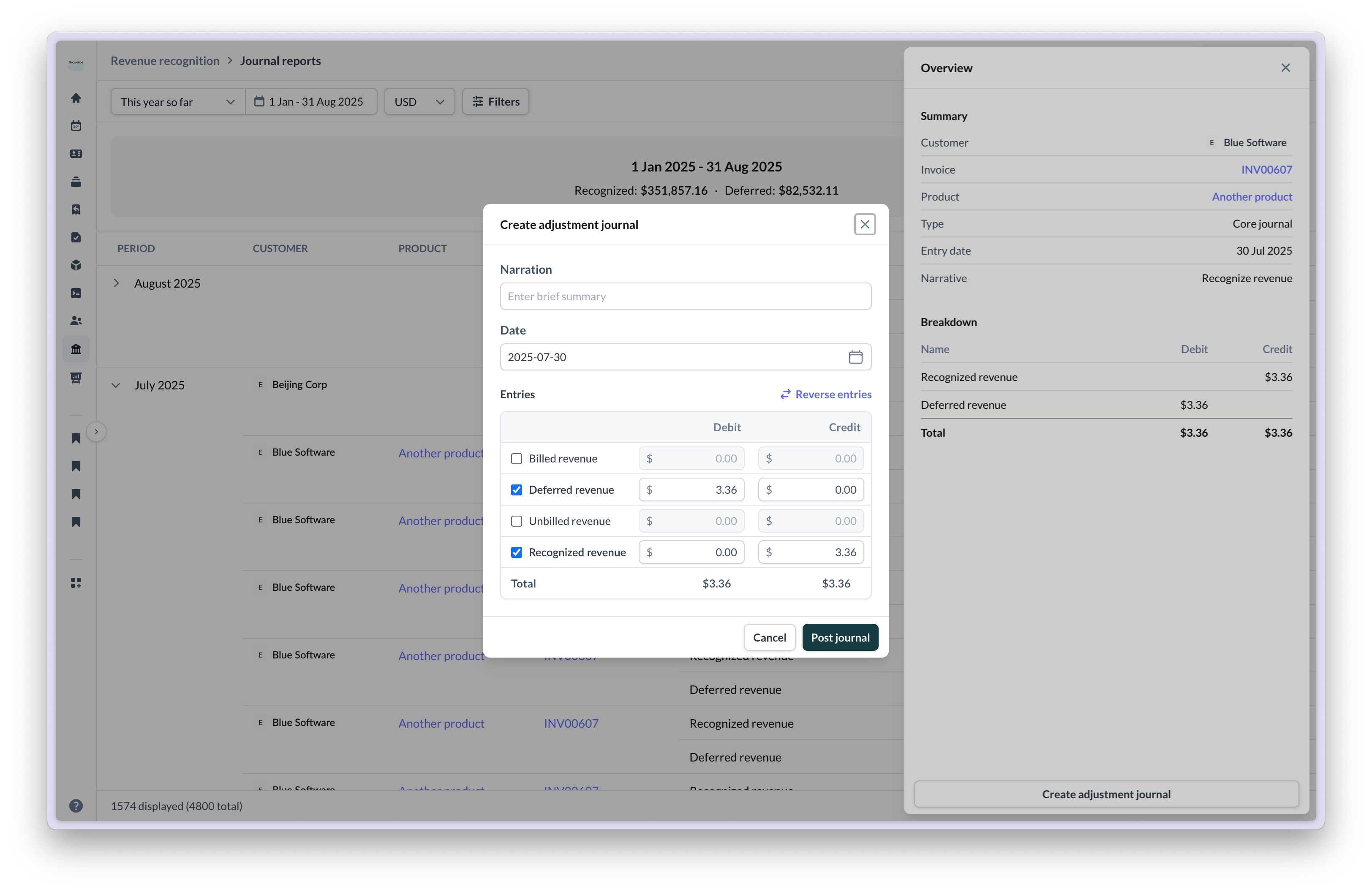 Common adjustment cases:
* **Correction entries**: fix recognition timing or amounts.
* **Manual recognition**: handle complex scenarios not automated.
* **Reclassifications**: move revenue between accounts.
* **One-off adjustments**: account for unique business events.
All manual adjustments are tracked separately, marked as **Standalone** in the Source field, and retain a full audit trail.
## Activity log
Successful revenue recognition runs for invoices and credit notes are written to the account's activity log. This provides a chronological record of what was recognized and when, separate from the journal entries themselves.
Common adjustment cases:
* **Correction entries**: fix recognition timing or amounts.
* **Manual recognition**: handle complex scenarios not automated.
* **Reclassifications**: move revenue between accounts.
* **One-off adjustments**: account for unique business events.
All manual adjustments are tracked separately, marked as **Standalone** in the Source field, and retain a full audit trail.
## Activity log
Successful revenue recognition runs for invoices and credit notes are written to the account's activity log. This provides a chronological record of what was recognized and when, separate from the journal entries themselves.