> ## Documentation Index
> Fetch the complete documentation index at: https://docs.sequencehq.com/llms.txt
> Use this file to discover all available pages before exploring further.
# Settings
> Configure how Sequence recognizes revenue across your business
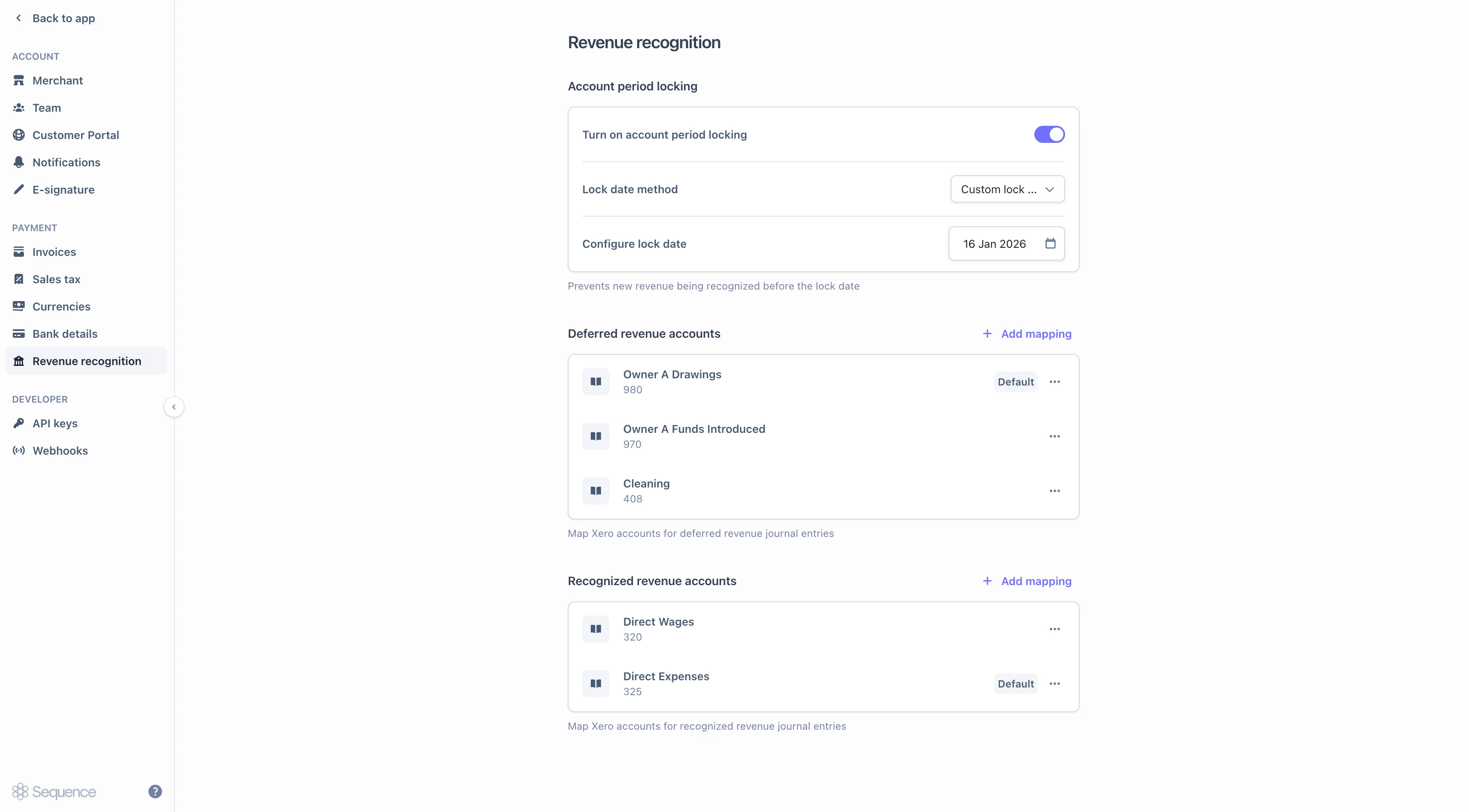
Revenue recognition settings are on the **Account / Revenue recognition** page. They control posting dates, allocation, credit note treatment, and Xero account mapping.
 ## Account period locking
Once a month has been closed in your general ledger, no further revenue should post into it. Account period locking enforces this on the Sequence side, so a late invoice or credit note cannot quietly write into a closed month.
The lock applies at journal creation, not at charge generation. Invoices and credit notes can still be issued for dates inside a locked period; they simply post their revenue against the next open period.
### Lock date method
Two options control how the lock date is determined:
| Method | Behaviour |
| ---------------------------------- | -------------------------------------------------------------------------------------------------------------------------------------------------------------------------- |
| **Accounting date (invoice date)** | Sequence uses each invoice's accounting (invoice) date as its effective lock floor. Revenue recognized before that date is held back and posted at the earliest open date. |
| **Custom lock date** | You set a single date for the whole account. Any revenue that would otherwise post before this date is realigned to the earliest open date. |
### Service periods that span the lock
A service period that begins before the lock and ends after it is not rejected. Sequence allocates revenue for the locked portion to the first open day, then continues recognizing day-by-day from that point.
For example, with a lock date of **31 Dec 2025**, an invoice covering **1 Dec 2025 to 31 Mar 2026** will:
* Catch up the December recognition in a single entry on **1 Jan 2026**.
* Recognize January, February, and March normally.
Journal narratives explicitly call out when an entry has been shifted to respect the lock, so the audit trail stays transparent.
### Credit notes against locked periods
Credit note reversals follow the same principle. Anything that would unwind into a locked period is held until the lock end date and catches up on the first open day.
## Allocation strategy
The allocation strategy controls how straight-line revenue is spread across the service period. All three strategies recognize the same total and give every full month an equal amount; they differ only in how the part-months at the start and end of the period are prorated.
| Strategy | How it works |
| ----------------------------------------------------------------- | -------------------------------------------------------------------------------------------------------------------------------------------------------------------------------------------------------------- |
| **Prorate first & last with daily rate, even months** *(default)* | The first and last part-months are paid at the contract's overall daily rate (total ÷ days); the remaining revenue is split evenly across the full months. The last full month absorbs any rounding remainder. |
| **Even months, prorate first, balance last** | Every full month recognizes an equal amount. The first part-month is prorated to its days, and the final month carries whatever balance remains. |
| **Even months, prorate first & last** | Every full month recognizes an equal amount, and both part-months are prorated in proportion to their days, so equal-length part-months always recognize equal revenue. |
See [Allocation methods](/revenue-recognition/recognition-methods#allocation-methods) for worked breakdowns showing how each strategy splits the same contract.
The setting is exposed on the revenue recognition settings API as `allocationPartialProrationStrategy`, with values `PRORATE_DAILY` (Prorate first & last with daily rate), `BALANCE_EVEN_MONTHLY` (Even months, balance last), or `PRORATE_MONTHLY` (Even months, prorate first & last). Changes apply to new recognition schedules; existing schedules continue under the strategy they were created with.
## Credit note revenue impact
Credit notes have two distinct effects on previously recognized revenue. The appropriate treatment depends on whether you prefer an immediate adjustment to recognized revenue or a prospective reallocation over the remaining performance period.
The credit note cancels future obligations. Sequence reverses revenue in this order:
1. Delete any future-dated recognition journals that have not posted yet.
2. Reverse remaining deferred revenue.
3. Reverse any already-recognized revenue if the credit exceeds the remaining deferred balance.
**What you'll see in reports**: the original invoice stops recognizing further revenue. Recognized + deferred no longer equals net billed, because the cancellation removes future obligations without redistributing the already-recognized portion.
Cancellation mode keeps each invoice and its credit note paired. Use it when the credit note represents a true cancellation (e.g., a refund for unused service).
The credit note spreads its reversal proportionally across the credit note's service period. The original invoice continues recognizing as scheduled.
**What you'll see in reports**: recognized + deferred ≈ net billed at any point in time. The original invoice and the credit note move daily in opposite directions, netting to the correct figure in aggregate.
Use adjustment mode when a credit represents a partial reduction in scope (e.g., a renegotiation, a usage true-down) and the reallocation matches how the business reads its revenue trajectory.
On the first day of the credit note service period, the deferred balance is reduced by the credit's net amount. From that day forward, the credit note posts daily mirror-image entries (debit recognized / credit deferred) against the original invoice's continuing recognition.
The setting is exposed on the API as `creditNoteRevenueImpact`, with values `CANCELLATION` or `ADJUSTMENT`. See [Credit notes](/revenue-recognition/credit-notes) for worked examples.
The two modes produce materially different journals. Switching the setting partway through a financial period will create inconsistencies between historical and new credit notes. Confirm and agree the change internally before switching the setting.
## Recognition triggers
Sequence creates recognition journals when an invoice or credit note reaches a state that signals delivery has begun:
* **Issued**: the document is finalized and posted, with an accounting (invoice) date assigned.
* **Marked as sent**: the document is marked sent without re-issuing (e.g., a previously issued invoice manually marked sent after export). Recognition runs on this transition for both invoices and credit notes, so a document marked sent outside the standard flow still recognizes.
Any subsequent edit that regenerates a credit note's line items will preserve the recognition method already chosen, so a straight-line credit note stays straight-line rather than flipping to point-in-time mid-life.
## Xero account mappings
If your account has the Xero integration enabled, the settings page also shows two mapping sections that tell Sequence which Xero ledger account each journal entry should hit.
* **Deferred revenue accounts**: the Xero accounts that hold deferred revenue (the liability side).
* **Recognized revenue accounts**: the Xero accounts that hold recognized revenue (the income side).
Each journal entry takes its Xero account code from the per-product mapping for that ledger account, managed on the product itself.
See [Xero integration](/integrations/xero) for the full Xero setup, including monthly aggregation and sign conventions.
## Account period locking
Once a month has been closed in your general ledger, no further revenue should post into it. Account period locking enforces this on the Sequence side, so a late invoice or credit note cannot quietly write into a closed month.
The lock applies at journal creation, not at charge generation. Invoices and credit notes can still be issued for dates inside a locked period; they simply post their revenue against the next open period.
### Lock date method
Two options control how the lock date is determined:
| Method | Behaviour |
| ---------------------------------- | -------------------------------------------------------------------------------------------------------------------------------------------------------------------------- |
| **Accounting date (invoice date)** | Sequence uses each invoice's accounting (invoice) date as its effective lock floor. Revenue recognized before that date is held back and posted at the earliest open date. |
| **Custom lock date** | You set a single date for the whole account. Any revenue that would otherwise post before this date is realigned to the earliest open date. |
### Service periods that span the lock
A service period that begins before the lock and ends after it is not rejected. Sequence allocates revenue for the locked portion to the first open day, then continues recognizing day-by-day from that point.
For example, with a lock date of **31 Dec 2025**, an invoice covering **1 Dec 2025 to 31 Mar 2026** will:
* Catch up the December recognition in a single entry on **1 Jan 2026**.
* Recognize January, February, and March normally.
Journal narratives explicitly call out when an entry has been shifted to respect the lock, so the audit trail stays transparent.
### Credit notes against locked periods
Credit note reversals follow the same principle. Anything that would unwind into a locked period is held until the lock end date and catches up on the first open day.
## Allocation strategy
The allocation strategy controls how straight-line revenue is spread across the service period. All three strategies recognize the same total and give every full month an equal amount; they differ only in how the part-months at the start and end of the period are prorated.
| Strategy | How it works |
| ----------------------------------------------------------------- | -------------------------------------------------------------------------------------------------------------------------------------------------------------------------------------------------------------- |
| **Prorate first & last with daily rate, even months** *(default)* | The first and last part-months are paid at the contract's overall daily rate (total ÷ days); the remaining revenue is split evenly across the full months. The last full month absorbs any rounding remainder. |
| **Even months, prorate first, balance last** | Every full month recognizes an equal amount. The first part-month is prorated to its days, and the final month carries whatever balance remains. |
| **Even months, prorate first & last** | Every full month recognizes an equal amount, and both part-months are prorated in proportion to their days, so equal-length part-months always recognize equal revenue. |
See [Allocation methods](/revenue-recognition/recognition-methods#allocation-methods) for worked breakdowns showing how each strategy splits the same contract.
The setting is exposed on the revenue recognition settings API as `allocationPartialProrationStrategy`, with values `PRORATE_DAILY` (Prorate first & last with daily rate), `BALANCE_EVEN_MONTHLY` (Even months, balance last), or `PRORATE_MONTHLY` (Even months, prorate first & last). Changes apply to new recognition schedules; existing schedules continue under the strategy they were created with.
## Credit note revenue impact
Credit notes have two distinct effects on previously recognized revenue. The appropriate treatment depends on whether you prefer an immediate adjustment to recognized revenue or a prospective reallocation over the remaining performance period.
The credit note cancels future obligations. Sequence reverses revenue in this order:
1. Delete any future-dated recognition journals that have not posted yet.
2. Reverse remaining deferred revenue.
3. Reverse any already-recognized revenue if the credit exceeds the remaining deferred balance.
**What you'll see in reports**: the original invoice stops recognizing further revenue. Recognized + deferred no longer equals net billed, because the cancellation removes future obligations without redistributing the already-recognized portion.
Cancellation mode keeps each invoice and its credit note paired. Use it when the credit note represents a true cancellation (e.g., a refund for unused service).
The credit note spreads its reversal proportionally across the credit note's service period. The original invoice continues recognizing as scheduled.
**What you'll see in reports**: recognized + deferred ≈ net billed at any point in time. The original invoice and the credit note move daily in opposite directions, netting to the correct figure in aggregate.
Use adjustment mode when a credit represents a partial reduction in scope (e.g., a renegotiation, a usage true-down) and the reallocation matches how the business reads its revenue trajectory.
On the first day of the credit note service period, the deferred balance is reduced by the credit's net amount. From that day forward, the credit note posts daily mirror-image entries (debit recognized / credit deferred) against the original invoice's continuing recognition.
The setting is exposed on the API as `creditNoteRevenueImpact`, with values `CANCELLATION` or `ADJUSTMENT`. See [Credit notes](/revenue-recognition/credit-notes) for worked examples.
The two modes produce materially different journals. Switching the setting partway through a financial period will create inconsistencies between historical and new credit notes. Confirm and agree the change internally before switching the setting.
## Recognition triggers
Sequence creates recognition journals when an invoice or credit note reaches a state that signals delivery has begun:
* **Issued**: the document is finalized and posted, with an accounting (invoice) date assigned.
* **Marked as sent**: the document is marked sent without re-issuing (e.g., a previously issued invoice manually marked sent after export). Recognition runs on this transition for both invoices and credit notes, so a document marked sent outside the standard flow still recognizes.
Any subsequent edit that regenerates a credit note's line items will preserve the recognition method already chosen, so a straight-line credit note stays straight-line rather than flipping to point-in-time mid-life.
## Xero account mappings
If your account has the Xero integration enabled, the settings page also shows two mapping sections that tell Sequence which Xero ledger account each journal entry should hit.
* **Deferred revenue accounts**: the Xero accounts that hold deferred revenue (the liability side).
* **Recognized revenue accounts**: the Xero accounts that hold recognized revenue (the income side).
Each journal entry takes its Xero account code from the per-product mapping for that ledger account, managed on the product itself.
See [Xero integration](/integrations/xero) for the full Xero setup, including monthly aggregation and sign conventions.