Apply a renewal quote directly to a customer’s existing billing schedule, or start a fresh one
When a customer renews, you can take a renewal quote and apply it directly to their existing billing schedule. Sequence appends the quote’s pricing to the current schedule, so the renewal continues on the same schedule instead of creating a separate one. You can still choose to start a new schedule if you prefer.
Once a renewal quote is published or accepted, select Execute quote. Sequence checks the customer’s existing billing schedules and opens the renewal execute flow.
1
Choose how to execute and pick the schedule
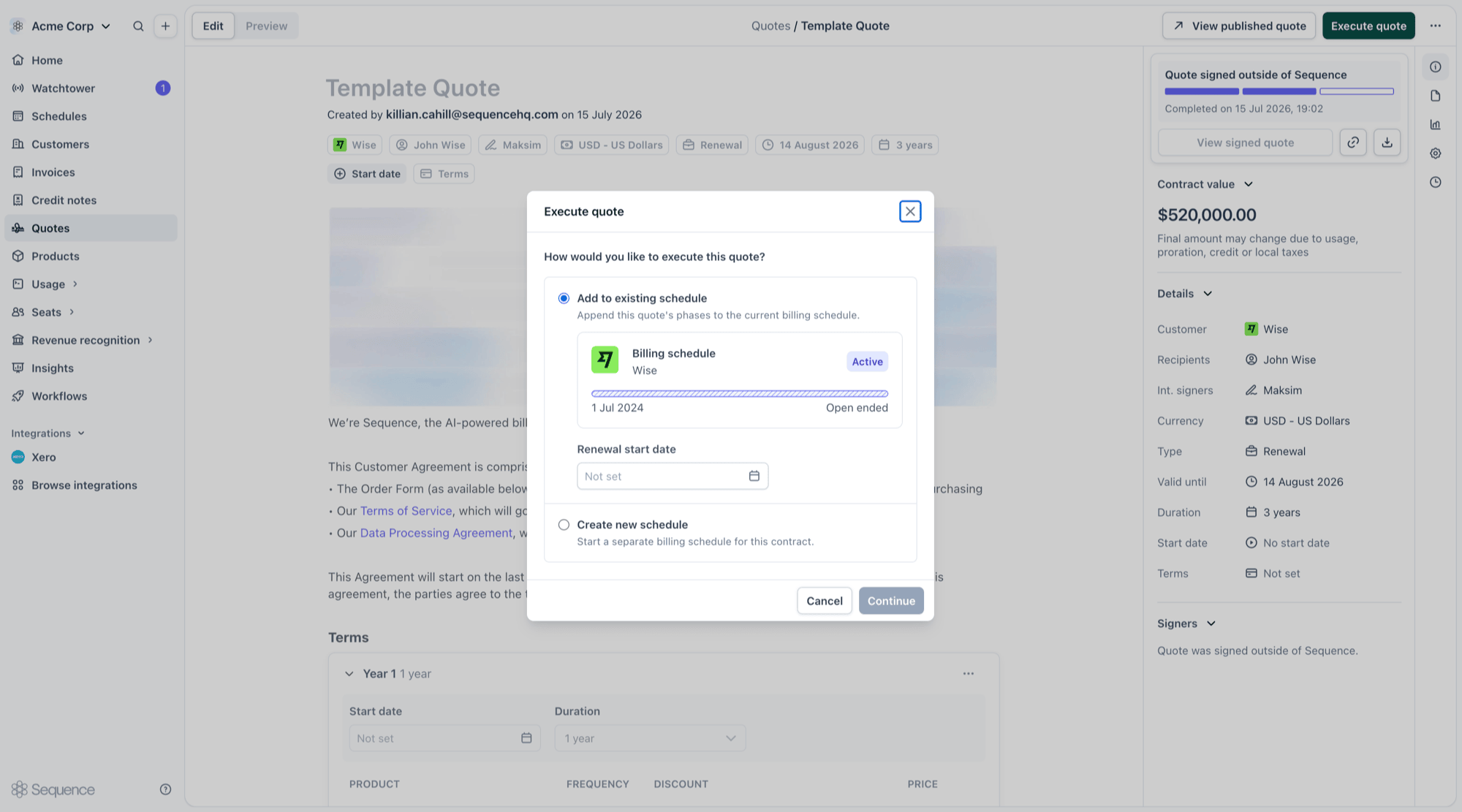
Choose how you want to execute the quote:
Add to existing schedule appends the quote’s phases to one of the customer’s current billing schedules.
Create new schedule starts a separate billing schedule for this contract.
If the customer has a schedule the renewal can be added to, Add to existing schedule is preselected. Pick the target schedule (if the customer has more than one eligible schedule) and set a renewal start date. Sequence shows a preview of the selected schedule, including its start date and whether it is open ended, so you can confirm you have the right one.
Choosing how to execute and selecting the schedule
2
Review and execute
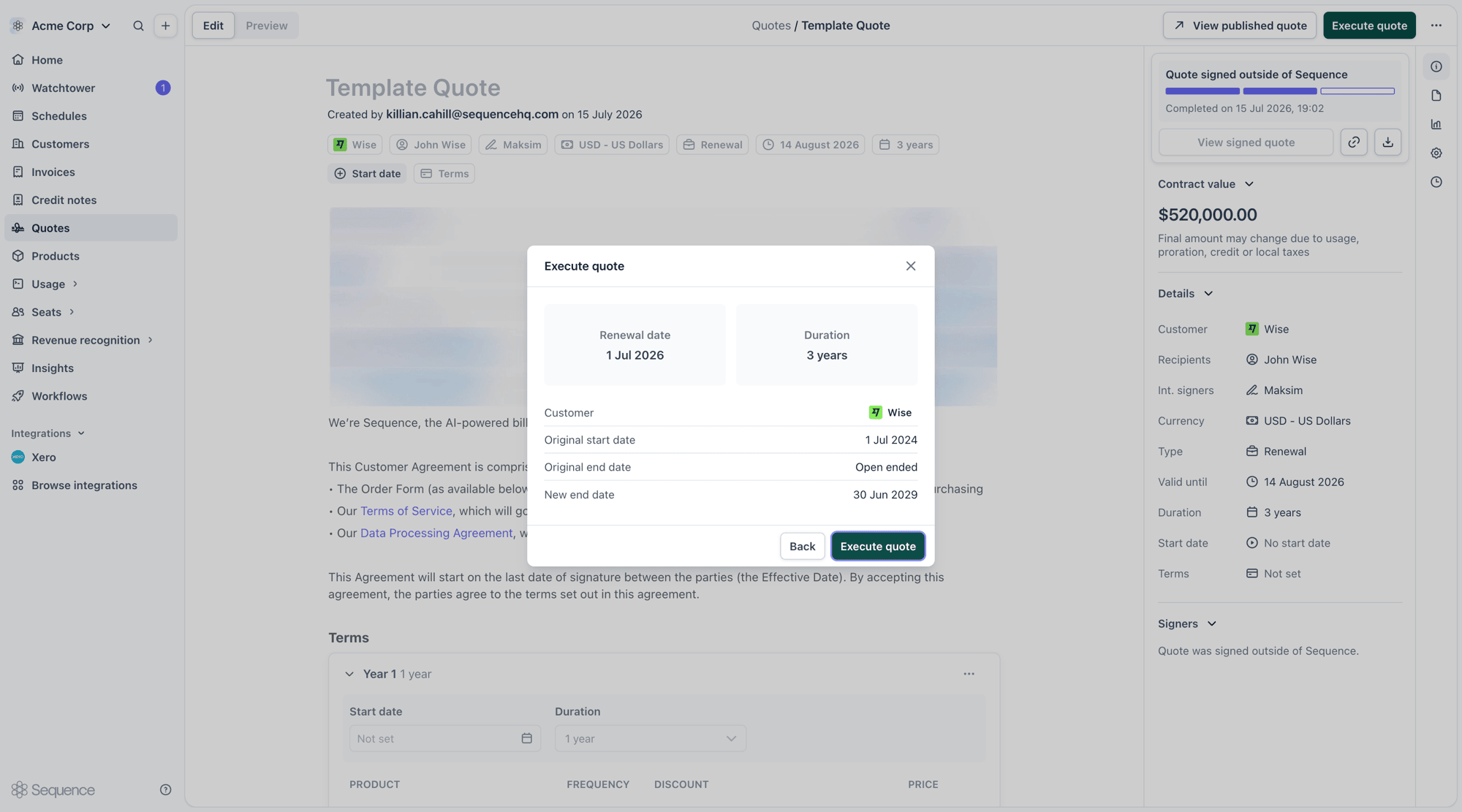
Select Continue to review the renewal. Sequence shows the renewal date, the contract duration, the customer, and how the schedule’s end date changes (its original end date and the new end date after the renewal). Check the details, then select Execute quote to apply the renewal.
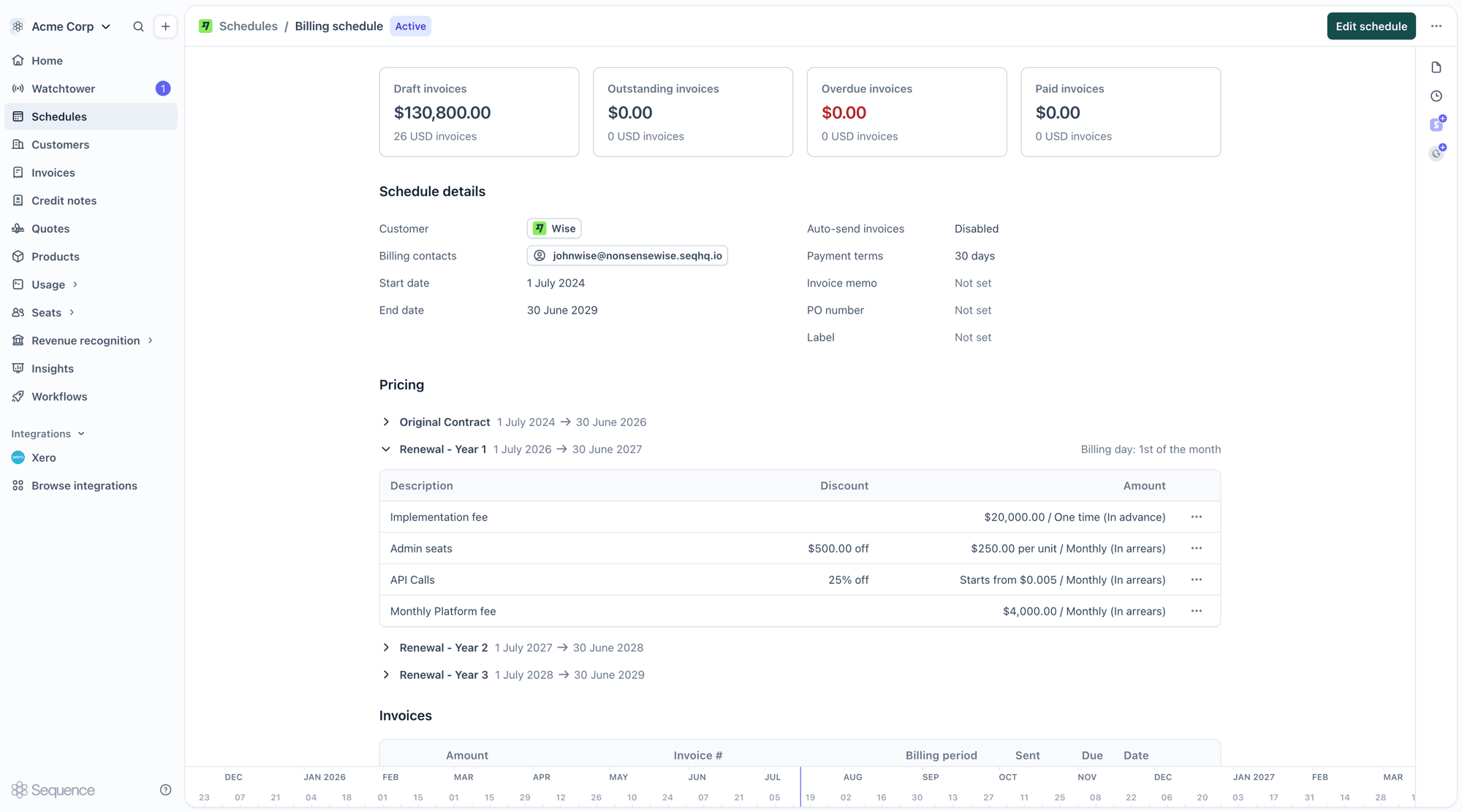
After you execute, the renewal’s phases are appended to the existing schedule and the schedule’s end date extends to cover the new term. The original contract phases stay intact, so you keep a single, continuous schedule with the full billing history in one place.In the example below, the renewal adds three yearly phases (Renewal - Year 1, Year 2 and Year 3) after the original contract, extending the schedule to 30 June 2029. Each renewal phase carries the pricing from the quote, and future invoices are generated automatically from these phases.
A schedule with the original contract and appended renewal phases
This flow applies to renewal quotes only. A quote’s deal type determines how it executes:
Renewal quotes open the renewal execute flow described below, where you can add the quote to an existing schedule or start a new one.
New business quotes always create a new billing schedule. They do not offer the add-to-existing option.
If the auto-execute signed quotes setting is enabled, signed quotes are executed automatically and always create a new billing schedule. They will not be applied to an existing schedule. To apply a renewal to an existing schedule, execute the quote manually.
The renewal start date anchors the new phases that are appended to the schedule.
For fixed-end schedules, the renewal start date is optional. Sequence pre-fills it with the day after the selected schedule ends, so the renewal picks up seamlessly where the current contract finishes.
For open-ended schedules, the renewal start date is required so you can choose an explicit changeover date.
The earliest date you can choose is the start of the schedule’s currently active phase. If the renewal start date falls before the schedule’s current end, Sequence truncates the existing schedule at that date and continues with the renewal pricing from there.
If the renewal changes the schedule’s billing period, Sequence sets the billing date for the new phases to match the renewal start date. You will see a note in the modal when this happens.
A schedule appears in the add-to-existing list when it:
Belongs to the same customer as the quote.
Is active.
Uses the same currency as the quote.
Some schedules cannot take a renewal. Schedules that would produce an invalid result (for example, incompatible proration on the combined phases) are flagged in the modal and cannot be selected.If the customer has no eligible schedule, the add-to-existing option is unavailable and you can create a new schedule instead.
Adding a renewal to an existing schedule edits that billing schedule, so it requires billing schedule edit permissions. Users without those permissions (for example, sales users) see the option locked and can still create a new schedule. Creating a new schedule does not require billing edit permissions.
{"docsConfig":{"theme":"palm","$schema":"https://mintlify.com/docs.json","name":"Sequence","colors":{"primary":"#716FFF","light":"#716FFF","dark":"#716FFF"},"logo":{"light":"https://mintcdn.com/sequence/bptUiZLY1oEfBaTZ/logo/light.svg?fit=max\u0026auto=format\u0026n=bptUiZLY1oEfBaTZ\u0026q=85\u0026s=02adc18f83942b8bdc86ec2b67937e1a","dark":"https://mintcdn.com/sequence/bptUiZLY1oEfBaTZ/logo/dark.svg?fit=max\u0026auto=format\u0026n=bptUiZLY1oEfBaTZ\u0026q=85\u0026s=38182050e1a27d88e9d34b686c985f32"},"favicon":"https://mintcdn.com/sequence/mEkhIlLyJGyDgjJd/favicon.png?fit=max\u0026auto=format\u0026n=mEkhIlLyJGyDgjJd\u0026q=85\u0026s=aebbf4110c663663a51501b506edfcdc","api":{"mdx":{"server":["https://eu.sequencehq.com/api","https://sandbox.sequencehq.com/api"]}},"navbar":{"links":[{"href":"https://dashboard.sequencehq.com","label":"Sign in"}],"primary":{"type":"button","label":"Request Access","href":"https://access.sequencehq.com/"}},"footer":{"socials":{"twitter":"https://twitter.com/SequenceHQ_","github":"https://github.com/sequencehq","linkedin":"https://www.linkedin.com/company/sequence-hq"}},"integrations":{"koala":{"publicApiKey":"pk_c9f1d1603102eb7e1c3a4f6922a45f72991b"},"plausible":{"domain":"sequencehq.com"}},"styling":{"latex":true},"navigation":{"global":{"anchors":[{"anchor":"Speak to an expert","icon":"message-check","href":"https://access.sequencehq.com/"},{"anchor":"Changelog","icon":"bolt","href":"https://www.sequencehq.com/changelog"},{"anchor":"Blog","icon":"rss","href":"https://www.sequencehq.com/blog"},{"anchor":"Principles","icon":"bookmark","href":"https://www.sequencehq.com/principles"}]},"pages":[]}},"deployment":{"deploymentMetadataValue":{"subdomain":"sequence","hasAudioNarration":false,"actualSubdomain":"sequence","customDomains":["docs.sequencehq.com"],"gitSource":{"type":"github","owner":"sequencehq","repo":"mintlify-docs","deployBranch":"main","contentDirectory":"","isPrivate":true,"mountPath":"","label":""},"chroma":{"liveDeploymentHistoryId":"6adbbb7aef4aad06f6721f44","collectionId":"d45a5c67-6cab-4069-99e1-a0f35ea4ea76","schemaVersion":"v3","latestBuiltDeploymentHistoryId":"6adbbb7aef4aad06f6721f44"},"entitlements":{"AI_CHAT":{"status":"ENABLED"},"WEB_MCP":{"status":"ENABLED"},"NARRATION":{"status":"ENABLED"}},"buildId":"6adbbb7aef4aad06f6721f44","clientVersion":"0.0.3966","searchFilterCounts":[{"language":"default","tag":"API Reference","count":388},{"language":"default","tag":"Version 2024-07-30","count":188},{"language":"default","tag":"Latest Live API","count":188},{"language":"default","tag":"Invoices","count":161},{"language":"default","tag":"Guides","count":134},{"language":"default","tag":"Billing","count":65},{"language":"default","tag":"Connectors","count":44},{"language":"default","tag":"Customer","count":38},{"language":"default","tag":"Collections","count":36},{"language":"default","tag":"Usage","count":34}]},"assistantConfig":{},"hasChatPermissions":true,"hasWebMcpPermissions":true,"toggles":[{"name":"kill-isr","enabled":true,"variant":{"name":"disabled","enabled":false,"feature_enabled":true},"impressionData":false},{"name":"agent-mintlify-slack","enabled":true,"variant":{"name":"disabled","enabled":false,"feature_enabled":true},"impressionData":false},{"name":"editor-v7-file-tree","enabled":true,"variant":{"name":"disabled","enabled":false,"feature_enabled":true},"impressionData":false},{"name":"agent-integrations-settings","enabled":true,"variant":{"name":"disabled","enabled":false,"feature_enabled":true},"impressionData":false},{"name":"automations-pr-grouping","enabled":true,"variant":{"name":"disabled","enabled":false,"feature_enabled":true},"impressionData":false},{"name":"custom-prefix","enabled":true,"variant":{"name":"disabled","enabled":false,"feature_enabled":true},"impressionData":false},{"name":"analytics-v7","enabled":true,"variant":{"name":"disabled","enabled":false,"feature_enabled":true},"impressionData":false},{"name":"user-flows-analytics","enabled":true,"variant":{"name":"disabled","enabled":false,"feature_enabled":true},"impressionData":false},{"name":"no-publish-flow","enabled":true,"variant":{"name":"disabled","enabled":false,"feature_enabled":true},"impressionData":false},{"name":"workos-onboarding","enabled":true,"variant":{"name":"disabled","enabled":false,"feature_enabled":true},"impressionData":false},{"name":"llms-txt-v2","enabled":true,"variant":{"name":"disabled","enabled":false,"feature_enabled":true},"impressionData":false},{"name":"pause-universal-search-reconcile","enabled":true,"variant":{"name":"disabled","enabled":false,"feature_enabled":true},"impressionData":false},{"name":"snapshot-serving-live","enabled":true,"variant":{"name":"disabled","enabled":false,"feature_enabled":true},"impressionData":false},{"name":"stripTemperatureMiddleware","enabled":true,"variant":{"name":"disabled","enabled":false,"feature_enabled":true},"impressionData":false},{"name":"per-site-search-delta","enabled":true,"variant":{"name":"disabled","enabled":false,"feature_enabled":true},"impressionData":false},{"name":"support-platform-pylon-zendesk","enabled":true,"variant":{"name":"disabled","enabled":false,"feature_enabled":true},"impressionData":false},{"name":"snapshot-serving","enabled":true,"variant":{"name":"disabled","enabled":false,"feature_enabled":true},"impressionData":false},{"name":"instant-rollback","enabled":true,"variant":{"name":"disabled","enabled":false,"feature_enabled":true},"impressionData":false},{"name":"granular-notifications-server","enabled":true,"variant":{"name":"disabled","enabled":false,"feature_enabled":true},"impressionData":false},{"name":"granular-notifications","enabled":true,"variant":{"name":"disabled","enabled":false,"feature_enabled":true},"impressionData":false},{"name":"editor-private-page-search","enabled":true,"variant":{"name":"disabled","enabled":false,"feature_enabled":true},"impressionData":false},{"name":"automations-fable","enabled":true,"variant":{"name":"disabled","enabled":false,"feature_enabled":true},"impressionData":false},{"name":"fixed-ai-action-pricing","enabled":true,"variant":{"name":"disabled","enabled":false,"feature_enabled":true},"impressionData":false},{"name":"automation-resolve-merge-conflict","enabled":true,"variant":{"name":"disabled","enabled":false,"feature_enabled":true},"impressionData":false},{"name":"scoped-publishing","enabled":true,"variant":{"name":"disabled","enabled":false,"feature_enabled":true},"impressionData":false},{"name":"mintql","enabled":true,"variant":{"name":"disabled","enabled":false,"feature_enabled":true},"impressionData":false},{"name":"page-level-analytics","enabled":true,"variant":{"name":"disabled","enabled":false,"feature_enabled":true},"impressionData":false},{"name":"editor-version-history-v2","enabled":true,"variant":{"name":"disabled","enabled":false,"feature_enabled":true},"impressionData":false},{"name":"editor-nav-generations","enabled":true,"variant":{"name":"disabled","enabled":false,"feature_enabled":true},"impressionData":false},{"name":"billing-page-v2","enabled":true,"variant":{"name":"disabled","enabled":false,"feature_enabled":true},"impressionData":false},{"name":"workspace-projects","enabled":true,"variant":{"name":"disabled","enabled":false,"feature_enabled":true},"impressionData":false},{"name":"assistant-v5","enabled":true,"variant":{"name":"disabled","enabled":false,"feature_enabled":true},"impressionData":false},{"name":"byok-sep-25","enabled":true,"variant":{"name":"disabled","enabled":false,"feature_enabled":true},"impressionData":false},{"name":"fork-pr-previews","enabled":true,"variant":{"name":"disabled","enabled":false,"feature_enabled":true},"impressionData":false},{"name":"revalidation-jwt","enabled":true,"variant":{"name":"disabled","enabled":false,"feature_enabled":true},"impressionData":false},{"name":"vite-origin","enabled":true,"variant":{"name":"disabled","enabled":false,"feature_enabled":true},"impressionData":false},{"name":"editor-agent-model-picker","enabled":true,"variant":{"name":"disabled","enabled":false,"feature_enabled":true},"impressionData":false},{"name":"billing-updated-9-15","enabled":true,"variant":{"name":"disabled","enabled":false,"feature_enabled":true},"impressionData":false},{"name":"hobby-abuse-scan","enabled":true,"variant":{"name":"disabled","enabled":false,"feature_enabled":true},"impressionData":false},{"name":"dashboard-inbox","enabled":true,"variant":{"name":"disabled","enabled":false,"feature_enabled":true},"impressionData":false}],"isAtlas":false,"googleFontsInlined":false},"customCss":[],"page":{"pagePath":"cpq/renew-contracts","slug":"/cpq/renew-contracts","pageMetadata":{"title":"Renew a contract","description":"Apply a renewal quote directly to a customer's existing billing schedule, or start a fresh one","icon":"arrows-rotate","iconType":"regular","og-title":"Renew a contract | Sequence Documentation","og-description":"Learn how to execute a renewal quote by applying it to an existing billing schedule in Sequence.","href":"/cpq/renew-contracts"},"description":{"compiledSource":"\"use strict\";\nconst {jsx: _jsx} = arguments[0];\nconst {useMDXComponents: _provideComponents} = arguments[0];\nfunction _createMdxContent(props) {\n const _components = {\n p: \"p\",\n ..._provideComponents(),\n ...props.components\n };\n return _jsx(_components.p, {\n children: \"Apply a renewal quote directly to a customer’s existing billing schedule, or start a fresh one\"\n });\n}\nfunction MDXContent(props = {}) {\n const {wrapper: MDXLayout} = {\n ..._provideComponents(),\n ...props.components\n };\n return MDXLayout ? _jsx(MDXLayout, {\n ...props,\n children: _jsx(_createMdxContent, {\n ...props\n })\n }) : _createMdxContent(props);\n}\nreturn {\n default: MDXContent\n};\n","frontmatter":{},"scope":{}},"pageType":"default","mdx":{"mdxSource":{"compiledSource":"\"use strict\";const{Fragment:_Fragment,jsx:_jsx,jsxs:_jsxs}=arguments[0];const{useMDXComponents:_provideComponents}=arguments[0];function _createMdxContent(props){const _components={a:`a`,li:`li`,p:`p`,strong:`strong`,ul:`ul`,..._provideComponents(),...props.components},{Frame,Heading,Note,OptimizedImage,Step,Steps}=_components;if(!Frame)_missingMdxReference(`Frame`,true);if(!Heading)_missingMdxReference(`Heading`,true);if(!Note)_missingMdxReference(`Note`,true);if(!OptimizedImage)_missingMdxReference(`OptimizedImage`,true);if(!Step)_missingMdxReference(`Step`,true);if(!Steps)_missingMdxReference(`Steps`,true);return _jsxs(_Fragment,{children:[_jsx(OptimizedImage,{src:`https://mintcdn.com/sequence/rbl8EdpBerRZd0yY/images/illustration/renewals_cover.png?fit=max\u0026auto=format\u0026n=rbl8EdpBerRZd0yY\u0026q=85\u0026s=3bde74dbae15397944f3b16b8b75020c`,alt:`Renew a contract`,\"data-og-width\":`3000`,width:`3000`,\"data-og-height\":`1000`,height:`1000`,\"data-path\":`images/illustration/renewals_cover.png`,\"data-optimize\":`true`,\"data-opv\":`3`,srcset:`https://mintcdn.com/sequence/rbl8EdpBerRZd0yY/images/illustration/renewals_cover.png?w=280\u0026fit=max\u0026auto=format\u0026n=rbl8EdpBerRZd0yY\u0026q=85\u0026s=bf64fd30a19d0ee90aed91cbc98da1d0 280w, https://mintcdn.com/sequence/rbl8EdpBerRZd0yY/images/illustration/renewals_cover.png?w=560\u0026fit=max\u0026auto=format\u0026n=rbl8EdpBerRZd0yY\u0026q=85\u0026s=e9843489b1390f076941e24f5a6495c5 560w, https://mintcdn.com/sequence/rbl8EdpBerRZd0yY/images/illustration/renewals_cover.png?w=840\u0026fit=max\u0026auto=format\u0026n=rbl8EdpBerRZd0yY\u0026q=85\u0026s=2ca527bab1986f57d741e06c61ce79fc 840w, https://mintcdn.com/sequence/rbl8EdpBerRZd0yY/images/illustration/renewals_cover.png?w=1100\u0026fit=max\u0026auto=format\u0026n=rbl8EdpBerRZd0yY\u0026q=85\u0026s=1dcb4c5ba2991f7aa396978ca53e28e9 1100w, https://mintcdn.com/sequence/rbl8EdpBerRZd0yY/images/illustration/renewals_cover.png?w=1650\u0026fit=max\u0026auto=format\u0026n=rbl8EdpBerRZd0yY\u0026q=85\u0026s=9264af978041f16af19cbc692b91f289 1650w, https://mintcdn.com/sequence/rbl8EdpBerRZd0yY/images/illustration/renewals_cover.png?w=2500\u0026fit=max\u0026auto=format\u0026n=rbl8EdpBerRZd0yY\u0026q=85\u0026s=78fb8d89b32e0bc0d1436a13de5fbafa 2500w`}),`\n`,_jsx(_components.p,{children:`When a customer renews, you can take a renewal quote and apply it directly to their existing billing schedule. Sequence appends the quote’s pricing to the current schedule, so the renewal continues on the same schedule instead of creating a separate one. You can still choose to start a new schedule if you prefer.`}),`\n`,_jsx(Heading,{level:`2`,id:`execute-a-renewal-quote`,children:`Execute a renewal quote`}),`\n`,_jsxs(_components.p,{children:[`Once a renewal quote is published or accepted, select `,_jsx(_components.strong,{children:`Execute quote`}),`. Sequence checks the customer’s existing billing schedules and opens the renewal execute flow.`]}),`\n`,_jsxs(Steps,{children:[_jsxs(Step,{title:`Choose how to execute and pick the schedule`,children:[_jsx(_components.p,{children:`Choose how you want to execute the quote:`}),_jsxs(_components.ul,{children:[`\n`,_jsxs(_components.li,{children:[_jsx(_components.strong,{children:`Add to existing schedule`}),` appends the quote’s phases to one of the customer’s current billing schedules.`]}),`\n`,_jsxs(_components.li,{children:[_jsx(_components.strong,{children:`Create new schedule`}),` starts a separate billing schedule for this contract.`]}),`\n`]}),_jsxs(_components.p,{children:[`If the customer has a schedule the renewal can be added to, `,_jsx(_components.strong,{children:`Add to existing schedule`}),` is preselected. Pick the target schedule (if the customer has more than one eligible schedule) and set a `,_jsx(_components.strong,{children:`renewal start date`}),`. Sequence shows a preview of the selected schedule, including its start date and whether it is open ended, so you can confirm you have the right one.`]}),_jsx(Frame,{caption:`Choosing how to execute and selecting the schedule`,children:_jsx(OptimizedImage,{src:`https://mintcdn.com/sequence/1UobobrTMVGabbvA/images/product/cpq/renewal_execute_modal.png?fit=max\u0026auto=format\u0026n=1UobobrTMVGabbvA\u0026q=85\u0026s=f2c2d013f9b7efb7f0cef581ee8041a5`,alt:`Choosing to add the renewal to an existing schedule and setting the renewal start date`,\"data-og-width\":`2000`,width:`2000`,\"data-og-height\":`1111`,height:`1111`,\"data-path\":`images/product/cpq/renewal_execute_modal.png`,\"data-optimize\":`true`,\"data-opv\":`3`,srcset:`https://mintcdn.com/sequence/1UobobrTMVGabbvA/images/product/cpq/renewal_execute_modal.png?w=280\u0026fit=max\u0026auto=format\u0026n=1UobobrTMVGabbvA\u0026q=85\u0026s=6c7d23524d0c2b48710edf11b3a34319 280w, https://mintcdn.com/sequence/1UobobrTMVGabbvA/images/product/cpq/renewal_execute_modal.png?w=560\u0026fit=max\u0026auto=format\u0026n=1UobobrTMVGabbvA\u0026q=85\u0026s=a81254495b74c71076b2ccb7e1e41065 560w, https://mintcdn.com/sequence/1UobobrTMVGabbvA/images/product/cpq/renewal_execute_modal.png?w=840\u0026fit=max\u0026auto=format\u0026n=1UobobrTMVGabbvA\u0026q=85\u0026s=50057f1e30f500474ebf2e51f9b2af70 840w, https://mintcdn.com/sequence/1UobobrTMVGabbvA/images/product/cpq/renewal_execute_modal.png?w=1100\u0026fit=max\u0026auto=format\u0026n=1UobobrTMVGabbvA\u0026q=85\u0026s=9233f62c9c2542df27346312eb9b8a73 1100w, https://mintcdn.com/sequence/1UobobrTMVGabbvA/images/product/cpq/renewal_execute_modal.png?w=1650\u0026fit=max\u0026auto=format\u0026n=1UobobrTMVGabbvA\u0026q=85\u0026s=5f1d16d1497a378fd3bd0c77cb9e784a 1650w, https://mintcdn.com/sequence/1UobobrTMVGabbvA/images/product/cpq/renewal_execute_modal.png?w=2500\u0026fit=max\u0026auto=format\u0026n=1UobobrTMVGabbvA\u0026q=85\u0026s=707b0421ff8b55145cf19df0bbbeb60d 2500w`})})]}),_jsxs(Step,{title:`Review and execute`,children:[_jsxs(_components.p,{children:[`Select `,_jsx(_components.strong,{children:`Continue`}),` to review the renewal. Sequence shows the renewal date, the contract duration, the customer, and how the schedule’s end date changes (its original end date and the new end date after the renewal). Check the details, then select `,_jsx(_components.strong,{children:`Execute quote`}),` to apply the renewal.`]}),_jsx(Frame,{caption:`Reviewing the renewal before executing`,children:_jsx(OptimizedImage,{src:`https://mintcdn.com/sequence/1UobobrTMVGabbvA/images/product/cpq/renewal_review.png?fit=max\u0026auto=format\u0026n=1UobobrTMVGabbvA\u0026q=85\u0026s=925afd72e8ab3416654f55152a9bad40`,alt:`Reviewing the renewal date, duration and new end date before executing`,\"data-og-width\":`2000`,width:`2000`,\"data-og-height\":`1111`,height:`1111`,\"data-path\":`images/product/cpq/renewal_review.png`,\"data-optimize\":`true`,\"data-opv\":`3`,srcset:`https://mintcdn.com/sequence/1UobobrTMVGabbvA/images/product/cpq/renewal_review.png?w=280\u0026fit=max\u0026auto=format\u0026n=1UobobrTMVGabbvA\u0026q=85\u0026s=c43dbfd6b650490a7cd93c3df9c2da74 280w, https://mintcdn.com/sequence/1UobobrTMVGabbvA/images/product/cpq/renewal_review.png?w=560\u0026fit=max\u0026auto=format\u0026n=1UobobrTMVGabbvA\u0026q=85\u0026s=303f57170abfd9f606744a8bac596b3b 560w, https://mintcdn.com/sequence/1UobobrTMVGabbvA/images/product/cpq/renewal_review.png?w=840\u0026fit=max\u0026auto=format\u0026n=1UobobrTMVGabbvA\u0026q=85\u0026s=cb4faf16dc3f15680151fabfebbe9861 840w, https://mintcdn.com/sequence/1UobobrTMVGabbvA/images/product/cpq/renewal_review.png?w=1100\u0026fit=max\u0026auto=format\u0026n=1UobobrTMVGabbvA\u0026q=85\u0026s=7ed7565244945f1d0ce127a8b9d64d20 1100w, https://mintcdn.com/sequence/1UobobrTMVGabbvA/images/product/cpq/renewal_review.png?w=1650\u0026fit=max\u0026auto=format\u0026n=1UobobrTMVGabbvA\u0026q=85\u0026s=3a0974a21ff71a756687ddd2bdd99b9a 1650w, https://mintcdn.com/sequence/1UobobrTMVGabbvA/images/product/cpq/renewal_review.png?w=2500\u0026fit=max\u0026auto=format\u0026n=1UobobrTMVGabbvA\u0026q=85\u0026s=9ab25fe9f4a13fc18285925ab3289eca 2500w`})})]})]}),`\n`,_jsx(Heading,{level:`2`,id:`the-renewed-billing-schedule`,children:`The renewed billing schedule`}),`\n`,_jsx(_components.p,{children:`After you execute, the renewal’s phases are appended to the existing schedule and the schedule’s end date extends to cover the new term. The original contract phases stay intact, so you keep a single, continuous schedule with the full billing history in one place.`}),`\n`,_jsxs(_components.p,{children:[`In the example below, the renewal adds three yearly phases (`,_jsx(_components.strong,{children:`Renewal - Year 1`}),`, `,_jsx(_components.strong,{children:`Year 2`}),` and `,_jsx(_components.strong,{children:`Year 3`}),`) after the original contract, extending the schedule to 30 June 2029. Each renewal phase carries the pricing from the quote, and future invoices are generated automatically from these phases.`]}),`\n`,_jsx(Frame,{caption:`A schedule with the original contract and appended renewal phases`,children:_jsx(OptimizedImage,{src:`https://mintcdn.com/sequence/1UobobrTMVGabbvA/images/product/cpq/renewal_appended_schedule.png?fit=max\u0026auto=format\u0026n=1UobobrTMVGabbvA\u0026q=85\u0026s=43cdb28588e6ce3b9180d703c0281b41`,alt:`Billing schedule showing the original contract followed by appended renewal phases`,\"data-og-width\":`2000`,width:`2000`,\"data-og-height\":`1111`,height:`1111`,\"data-path\":`images/product/cpq/renewal_appended_schedule.png`,\"data-optimize\":`true`,\"data-opv\":`3`,srcset:`https://mintcdn.com/sequence/1UobobrTMVGabbvA/images/product/cpq/renewal_appended_schedule.png?w=280\u0026fit=max\u0026auto=format\u0026n=1UobobrTMVGabbvA\u0026q=85\u0026s=bd2702f384b50ec20bfa8affb0c1f517 280w, https://mintcdn.com/sequence/1UobobrTMVGabbvA/images/product/cpq/renewal_appended_schedule.png?w=560\u0026fit=max\u0026auto=format\u0026n=1UobobrTMVGabbvA\u0026q=85\u0026s=ac38fa8732760cac8d74cda093e47239 560w, https://mintcdn.com/sequence/1UobobrTMVGabbvA/images/product/cpq/renewal_appended_schedule.png?w=840\u0026fit=max\u0026auto=format\u0026n=1UobobrTMVGabbvA\u0026q=85\u0026s=52cb47be26f8d4ff1904f8e8efc52dbb 840w, https://mintcdn.com/sequence/1UobobrTMVGabbvA/images/product/cpq/renewal_appended_schedule.png?w=1100\u0026fit=max\u0026auto=format\u0026n=1UobobrTMVGabbvA\u0026q=85\u0026s=f92388f64cd1095a5f1ef5667f722b7a 1100w, https://mintcdn.com/sequence/1UobobrTMVGabbvA/images/product/cpq/renewal_appended_schedule.png?w=1650\u0026fit=max\u0026auto=format\u0026n=1UobobrTMVGabbvA\u0026q=85\u0026s=201b065fc9d0e8c3baa12c5b772f2c50 1650w, https://mintcdn.com/sequence/1UobobrTMVGabbvA/images/product/cpq/renewal_appended_schedule.png?w=2500\u0026fit=max\u0026auto=format\u0026n=1UobobrTMVGabbvA\u0026q=85\u0026s=e733e5e0bc402bb4fa16579357b681d1 2500w`})}),`\n`,_jsx(Heading,{level:`2`,id:`before-you-start`,children:`Before you start`}),`\n`,_jsxs(_components.p,{children:[`This flow applies to `,_jsx(_components.strong,{children:`renewal quotes only`}),`. A quote’s deal type determines how it executes:`]}),`\n`,_jsxs(_components.ul,{children:[`\n`,_jsxs(_components.li,{children:[_jsx(_components.strong,{children:`Renewal quotes`}),` open the renewal execute flow described below, where you can add the quote to an existing schedule or start a new one.`]}),`\n`,_jsxs(_components.li,{children:[_jsx(_components.strong,{children:`New business quotes`}),` always create a new billing schedule. They do not offer the add-to-existing option.`]}),`\n`]}),`\n`,_jsx(Note,{children:_jsxs(_components.p,{children:[`If the `,_jsx(_components.strong,{children:`auto-execute signed quotes`}),` setting is enabled, signed quotes are executed automatically and always create a new billing schedule. They will not be applied to an existing schedule. To apply a renewal to an existing schedule, execute the quote manually.`]})}),`\n`,_jsx(Heading,{level:`2`,id:`how-the-renewal-start-date-works`,children:`How the renewal start date works`}),`\n`,_jsx(_components.p,{children:`The renewal start date anchors the new phases that are appended to the schedule.`}),`\n`,_jsxs(_components.ul,{children:[`\n`,_jsxs(_components.li,{children:[`For `,_jsx(_components.strong,{children:`fixed-end schedules`}),`, the renewal start date is optional. Sequence pre-fills it with the day after the selected schedule ends, so the renewal picks up seamlessly where the current contract finishes.`]}),`\n`,_jsxs(_components.li,{children:[`For `,_jsx(_components.strong,{children:`open-ended schedules`}),`, the renewal start date is required so you can choose an explicit changeover date.`]}),`\n`,_jsx(_components.li,{children:`The earliest date you can choose is the start of the schedule’s currently active phase. If the renewal start date falls before the schedule’s current end, Sequence truncates the existing schedule at that date and continues with the renewal pricing from there.`}),`\n`]}),`\n`,_jsx(Note,{children:_jsx(_components.p,{children:`If the renewal changes the schedule’s billing period, Sequence sets the billing date for the new phases to match the renewal start date. You will see a note in the modal when this happens.`})}),`\n`,_jsx(Heading,{level:`2`,id:`which-schedules-are-eligible`,children:`Which schedules are eligible`}),`\n`,_jsx(_components.p,{children:`A schedule appears in the add-to-existing list when it:`}),`\n`,_jsxs(_components.ul,{children:[`\n`,_jsx(_components.li,{children:`Belongs to the same customer as the quote.`}),`\n`,_jsxs(_components.li,{children:[`Is `,_jsx(_components.strong,{children:`active`}),`.`]}),`\n`,_jsxs(_components.li,{children:[`Uses the `,_jsx(_components.strong,{children:`same currency`}),` as the quote.`]}),`\n`]}),`\n`,_jsx(_components.p,{children:`Some schedules cannot take a renewal. Schedules that would produce an invalid result (for example, incompatible proration on the combined phases) are flagged in the modal and cannot be selected.`}),`\n`,_jsx(_components.p,{children:`If the customer has no eligible schedule, the add-to-existing option is unavailable and you can create a new schedule instead.`}),`\n`,_jsx(Heading,{level:`2`,id:`permissions`,children:`Permissions`}),`\n`,_jsxs(_components.p,{children:[`Adding a renewal to an existing schedule edits that billing schedule, so it requires `,_jsx(_components.strong,{children:`billing schedule edit permissions`}),`. Users without those permissions (for example, sales users) see the option locked and can still create a new schedule. Creating a new schedule does not require billing edit permissions.`]}),`\n`,_jsx(Heading,{level:`2`,id:`related`,children:`Related`}),`\n`,_jsxs(_components.ul,{children:[`\n`,_jsx(_components.li,{children:_jsx(_components.a,{href:`/cpq/create-quotes`,children:`Create quotes`})}),`\n`,_jsx(_components.li,{children:_jsx(_components.a,{href:`/billing/create-billing-schedules`,children:`Create billing schedules`})}),`\n`,_jsx(_components.li,{children:_jsx(_components.a,{href:`/billing/billing-schedule-phases`,children:`Billing schedule phases`})}),`\n`]})]})}function MDXContent(props={}){const{wrapper:MDXLayout}={..._provideComponents(),...props.components};return MDXLayout?_jsx(MDXLayout,{...props,children:_jsx(_createMdxContent,{...props})}):_createMdxContent(props)}return{default:MDXContent};function _missingMdxReference(id,component){throw new Error(`Expected `+(component?`component`:`object`)+\" `\"+id+\"` to be defined: you likely forgot to import, pass, or provide it.\")}","frontmatter":{},"scope":{"config":{},"pageMetadata":{"title":"Renew a contract","description":"Apply a renewal quote directly to a customer's existing billing schedule, or start a fresh one","icon":"arrows-rotate","iconType":"regular","og-title":"Renew a contract | Sequence Documentation","og-description":"Learn how to execute a renewal quote by applying it to an existing billing schedule in Sequence.","href":"/cpq/renew-contracts"}}},"mdxSourceWithNoJs":null},"mdxExtracts":{"tableOfContents":[{"title":"Execute a renewal quote","slug":"execute-a-renewal-quote","depth":2,"children":[]},{"title":"The renewed billing schedule","slug":"the-renewed-billing-schedule","depth":2,"children":[]},{"title":"Before you start","slug":"before-you-start","depth":2,"children":[]},{"title":"How the renewal start date works","slug":"how-the-renewal-start-date-works","depth":2,"children":[]},{"title":"Which schedules are eligible","slug":"which-schedules-are-eligible","depth":2,"children":[]},{"title":"Permissions","slug":"permissions","depth":2,"children":[]},{"title":"Related","slug":"related","depth":2,"children":[]}],"codeExamples":{}},"jsLinks":[],"subdomain":"sequence","siteName":"Sequence","title":"Renew a contract - Sequence","navMaps":{"firstHrefInVersion":{},"firstHrefInLanguage":{}},"lastModified":"2026-07-16T12:59:39.626Z","originalFileLocation":"cpq/renew-contracts.mdx"},"headHtml":"\u003cscript data-mint-head>(function(){var d=document.documentElement,p=null;if(!p){try{p=localStorage.getItem(\"isDarkMode\")}catch(e){}if(p==='true')p='dark';else if(p==='false')p='light';if(p!=='light'\u0026\u0026p!=='dark'\u0026\u0026p!=='system')p=\"system\"}var r=p==='system'?(matchMedia(\"(prefers-color-scheme: dark)\").matches?'dark':'light'):p;d.classList.remove(r==='dark'?'light':'dark');d.classList.add(r);d.setAttribute(\"data-theme-preference\",p)})();\u003c/script>\u003cmeta data-mint-head name=\"description\" content=\"Apply a renewal quote directly to a customer\u0026#x27;s existing billing schedule, or start a fresh one\">\u003cmeta data-mint-head name=\"application-name\" content=\"Sequence\">\u003cmeta data-mint-head name=\"generator\" content=\"Mintlify\">\u003clink data-mint-head rel=\"icon\" type=\"image/png\" sizes=\"192x192\" href=\"/mintlify-assets/_mintlify/favicons/sequence/4AxtUIMpbcFOrkSv/_generated/favicon/android-chrome-192x192.png\" media=\"(prefers-color-scheme: light)\">\u003clink data-mint-head rel=\"apple-touch-icon\" type=\"image/png\" sizes=\"180x180\" href=\"/mintlify-assets/_mintlify/favicons/sequence/4AxtUIMpbcFOrkSv/_generated/favicon/apple-touch-icon.png\">\u003clink data-mint-head rel=\"icon\" type=\"image/png\" sizes=\"16x16\" href=\"/mintlify-assets/_mintlify/favicons/sequence/4AxtUIMpbcFOrkSv/_generated/favicon/favicon-16x16.png\" media=\"(prefers-color-scheme: light)\">\u003clink data-mint-head rel=\"icon\" type=\"image/png\" sizes=\"32x32\" href=\"/mintlify-assets/_mintlify/favicons/sequence/4AxtUIMpbcFOrkSv/_generated/favicon/favicon-32x32.png\" media=\"(prefers-color-scheme: light)\">\u003clink data-mint-head rel=\"shortcut icon\" type=\"image/x-icon\" href=\"/mintlify-assets/_mintlify/favicons/sequence/4AxtUIMpbcFOrkSv/_generated/favicon/favicon.ico\" media=\"(prefers-color-scheme: light)\">\u003clink data-mint-head rel=\"icon\" type=\"image/png\" sizes=\"192x192\" href=\"/mintlify-assets/_mintlify/favicons/sequence/4AxtUIMpbcFOrkSv/_generated/favicon-dark/android-chrome-192x192.png\" media=\"(prefers-color-scheme: dark)\">\u003clink data-mint-head rel=\"icon\" type=\"image/png\" sizes=\"16x16\" href=\"/mintlify-assets/_mintlify/favicons/sequence/4AxtUIMpbcFOrkSv/_generated/favicon-dark/favicon-16x16.png\" media=\"(prefers-color-scheme: dark)\">\u003clink data-mint-head rel=\"icon\" type=\"image/png\" sizes=\"32x32\" href=\"/mintlify-assets/_mintlify/favicons/sequence/4AxtUIMpbcFOrkSv/_generated/favicon-dark/favicon-32x32.png\" media=\"(prefers-color-scheme: dark)\">\u003clink data-mint-head rel=\"shortcut icon\" type=\"image/x-icon\" href=\"/mintlify-assets/_mintlify/favicons/sequence/4AxtUIMpbcFOrkSv/_generated/favicon-dark/favicon.ico\" media=\"(prefers-color-scheme: dark)\">\u003cmeta data-mint-head property=\"og:title\" content=\"Renew a contract - Sequence\">\u003cmeta data-mint-head property=\"og:description\" content=\"Apply a renewal quote directly to a customer\u0026#x27;s existing billing schedule, or start a fresh one\">\u003cmeta data-mint-head property=\"og:site_name\" content=\"Sequence\">\u003cmeta data-mint-head property=\"og:url\" content=\"https://docs.sequencehq.com/cpq/renew-contracts\">\u003cmeta data-mint-head property=\"og:type\" content=\"website\">\u003cmeta data-mint-head property=\"og:image\" content=\"https://sequence.mintlify.app/_mintlify/api/og/v2?division=CPQ\u0026amp;title=Renew+a+contract\u0026amp;description=Apply+a+renewal+quote+directly+to+a+customer%27s+existing+billing+schedule%2C+or+start+a+fresh+one\u0026amp;theme=9a5e862c56c084d213b04486\u0026amp;signature=25813313dc427d3d6c2b48ad892f25cea6ec0c2a8da452314256c6cff93d76ff\">\u003cmeta data-mint-head property=\"og:image:width\" content=\"1200\">\u003cmeta data-mint-head property=\"og:image:height\" content=\"630\">\u003cmeta data-mint-head name=\"twitter:card\" content=\"summary_large_image\">\u003cmeta data-mint-head name=\"twitter:title\" content=\"Renew a contract - Sequence\">\u003cmeta data-mint-head name=\"twitter:description\" content=\"Apply a renewal quote directly to a customer\u0026#x27;s existing billing schedule, or start a fresh one\">\u003cmeta data-mint-head name=\"twitter:image\" content=\"https://sequence.mintlify.app/_mintlify/api/og/v2?division=CPQ\u0026amp;title=Renew+a+contract\u0026amp;description=Apply+a+renewal+quote+directly+to+a+customer%27s+existing+billing+schedule%2C+or+start+a+fresh+one\u0026amp;theme=9a5e862c56c084d213b04486\u0026amp;signature=25813313dc427d3d6c2b48ad892f25cea6ec0c2a8da452314256c6cff93d76ff\">\u003cmeta data-mint-head name=\"twitter:image:width\" content=\"1200\">\u003cmeta data-mint-head name=\"twitter:image:height\" content=\"630\">\u003cmeta data-mint-head name=\"msapplication-config\" content=\"/mintlify-assets/_mintlify/favicons/sequence/4AxtUIMpbcFOrkSv/_generated/favicon/browserconfig.xml\">\u003cmeta data-mint-head name=\"apple-mobile-web-app-title\" content=\"Sequence\">\u003cmeta data-mint-head name=\"msapplication-TileColor\" content=\"#716FFF\">\u003clink data-mint-head rel=\"canonical\" href=\"https://docs.sequencehq.com/cpq/renew-contracts\">\u003clink data-mint-head rel=\"alternate\" type=\"application/xml\" href=\"/sitemap.xml\">\u003clink data-mint-head rel=\"alternate\" type=\"text/markdown\" href=\"/cpq/renew-contracts.md\">\u003cscript data-mint-head type=\"application/ld+json\">{\"@context\":\"https://schema.org\",\"@graph\":[{\"@type\":\"Organization\",\"@id\":\"https://docs.sequencehq.com/#organization\",\"name\":\"Sequence\",\"url\":\"https://docs.sequencehq.com\",\"logo\":{\"@type\":\"ImageObject\",\"url\":\"https://mintcdn.com/sequence/bptUiZLY1oEfBaTZ/logo/light.svg?fit=max\u0026auto=format\u0026n=bptUiZLY1oEfBaTZ\u0026q=85\u0026s=02adc18f83942b8bdc86ec2b67937e1a\"}},{\"@type\":\"WebSite\",\"@id\":\"https://docs.sequencehq.com#website\",\"name\":\"Sequence\",\"url\":\"https://docs.sequencehq.com\",\"publisher\":{\"@id\":\"https://docs.sequencehq.com/#organization\"}},{\"@type\":\"WebPage\",\"@id\":\"https://docs.sequencehq.com/cpq/renew-contracts#webpage\",\"url\":\"https://docs.sequencehq.com/cpq/renew-contracts\",\"name\":\"Renew a contract\",\"description\":\"Apply a renewal quote directly to a customer's existing billing schedule, or start a fresh one\",\"dateModified\":\"2026-07-16T12:59:39.626Z\",\"isPartOf\":{\"@id\":\"https://docs.sequencehq.com#website\"},\"breadcrumb\":{\"@id\":\"https://docs.sequencehq.com/cpq/renew-contracts#breadcrumb\"}},{\"@type\":\"BreadcrumbList\",\"@id\":\"https://docs.sequencehq.com/cpq/renew-contracts#breadcrumb\",\"itemListElement\":[{\"@type\":\"ListItem\",\"position\":1,\"name\":\"Guides\",\"item\":\"https://docs.sequencehq.com/getting-started/overview\"},{\"@type\":\"ListItem\",\"position\":2,\"name\":\"CPQ\",\"item\":\"https://docs.sequencehq.com/cpq/create-quotes\"},{\"@type\":\"ListItem\",\"position\":3,\"name\":\"Renew a contract\",\"item\":\"https://docs.sequencehq.com/cpq/renew-contracts\"}]},{\"@type\":[\"Article\",\"TechArticle\"],\"@id\":\"https://docs.sequencehq.com/cpq/renew-contracts#article\",\"headline\":\"Renew a contract\",\"name\":\"Renew a contract\",\"description\":\"Apply a renewal quote directly to a customer's existing billing schedule, or start a fresh one\",\"url\":\"https://docs.sequencehq.com/cpq/renew-contracts\",\"mainEntityOfPage\":{\"@id\":\"https://docs.sequencehq.com/cpq/renew-contracts#webpage\"},\"dateModified\":\"2026-07-16T12:59:39.626Z\",\"publisher\":{\"@id\":\"https://docs.sequencehq.com/#organization\"},\"isPartOf\":{\"@id\":\"https://docs.sequencehq.com#website\"}}]}\u003c/script>\u003cscript data-mint-head type=\"application/ld+json\">{\"@context\":\"https://schema.org\",\"@type\":\"WebSite\",\"name\":\"Sequence\",\"creator\":{\"@type\":\"Organization\",\"name\":\"Mintlify\",\"url\":\"https://mintlify.com\"}}\u003c/script>","siteName":"Sequence","nav":{"global":{"anchors":[{"anchor":"Speak to an expert","icon":"message-check","href":"https://access.sequencehq.com/"},{"anchor":"Changelog","icon":"bolt","href":"https://www.sequencehq.com/changelog"},{"anchor":"Blog","icon":"rss","href":"https://www.sequencehq.com/blog"},{"anchor":"Principles","icon":"bookmark","href":"https://www.sequencehq.com/principles"}]},"tabs":[{"tab":"Guides","groups":[{"group":"Guides","pages":[{"group":"Start guide","pages":[{"sidebarTitle":"Overview","title":"Sequence","icon":"circle-dot","iconType":"regular","href":"/getting-started/overview"},{"title":"Concepts","icon":"grid-2","iconType":"regular","href":"/getting-started/concepts"},{"title":"Onboarding","icon":"list-check","iconType":"regular","href":"/getting-started/onboarding"},{"title":"Migration","icon":"right-left","iconType":"regular","href":"/getting-started/migration"}]},{"group":"Billing","pages":[{"title":"Concepts","icon":"book-open","iconType":"regular","href":"/billing/billing-concepts"},{"title":"Create billing schedules","sidebarTitle":"Billing schedules","icon":"calendar-range","iconType":"regular","href":"/billing/create-billing-schedules"},{"title":"Phases","icon":"bars-progress","iconType":"regular","href":"/billing/billing-schedule-phases"},{"title":"Credit-based billing","icon":"coins","iconType":"regular","href":"/billing/credit-based-billing"},{"title":"Milestone billing","icon":"list-check","iconType":"regular","href":"/billing/milestone-billing"},{"title":"On-demand billing","icon":"arrow-right-to-line","iconType":"regular","href":"/billing/on-demand-billing"},{"title":"Per-event billing","icon":"bolt","iconType":"regular","href":"/billing/per-event-billing"},{"title":"Roll-up billing","icon":"up-from-dotted-line","iconType":"regular","href":"/billing/roll-up-billing"},{"title":"Multi-entity support","icon":"buildings","iconType":"regular","href":"/billing/multi-entity-support"}]},{"group":"Automations","pages":[{"title":"Workflows","icon":"diagram-project","iconType":"solid","href":"/agents/workflows"},{"title":"Payment reminders","icon":"bell","iconType":"solid","href":"/agents/payment-reminders"}]},{"group":"Agents","pages":[{"title":"Watchtower","icon":"lighthouse","iconType":"solid","href":"/agents/watchtower"},{"title":"Contract intake agent","icon":"infinity","iconType":"solid","href":"/agents/contract-intake"},{"title":"Accounts receivable agent","icon":"robot","iconType":"solid","href":"/agents/ar-agent"}]},{"group":"Labs","pages":[{"title":"Labs","icon":"flask","iconType":"solid","href":"/labs/overview"},{"title":"MCP server","icon":"plug","iconType":"solid","href":"/labs/mcp"}]},{"group":"Products and prices","pages":[{"title":"Product catalog","icon":"table-list","iconType":"solid","href":"/plans-products/product-catalogue"},{"title":"Self-serve plans","icon":"users-rectangle","iconType":"solid","href":"/plans-products/self-serve-plans"},{"title":"Standard pricing","icon":"square-dollar","iconType":"regular","href":"/plans-products/subscription-pricing"},{"title":"Usage-based pricing","icon":"chart-mixed-up-circle-dollar","iconType":"solid","href":"/plans-products/usage-based-pricing"},{"title":"Seat-based pricing","icon":"user-plus","iconType":"regular","href":"/plans-products/seat-based-pricing"},{"title":"Minimum fees","icon":"circle-quarter-stroke","iconType":"regular","href":"/plans-products/minimum-fees"}]},{"group":"CPQ","pages":[{"title":"Create quotes","icon":"file-contract","iconType":"regular","href":"/cpq/create-quotes"},{"title":"Approving a quote","description":"Review, approve or reject a quote that's been submitted for sign-off before it reaches a customer","icon":"clipboard-check","iconType":"solid","href":"/cpq/approve-quote"},{"title":"Renew a contract","icon":"arrows-rotate","iconType":"regular","href":"/cpq/renew-contracts"},{"title":"E-signature","description":"Create a frictionless signing experience with compliant e-signatures powered by Dropbox Sign","icon":"pen-field","iconType":"regular","href":"/cpq/esignature"},{"title":"Attach documents","icon":"file-arrow-up","iconType":"regular","href":"/cpq/upload-agreements"}]},{"group":"Customers","pages":[{"title":"Create customers","icon":"users","iconType":"solid","href":"/customers/create-customer"},{"title":"Customer portal","icon":"users-viewfinder","iconType":"solid","href":"/customers/customer-portal"},{"title":"Parent child hierarchy","icon":"sitemap","iconType":"solid","href":"/customers/create-customer-relationships"},{"title":"Self-serve sign-up flow","icon":"arrow-progress","iconType":"solid","href":"/customers/building-integration"}]},{"group":"Events \u0026 Metrics","pages":[{"title":"Overview","icon":"chart-simple","iconType":"solid","href":"/metrics-events/overview"},{"title":"Usage events","icon":"square-code","iconType":"regular","href":"/metrics-events/usage-events"},{"title":"Usage metrics","icon":"gauge-simple-high","iconType":"regular","href":"/metrics-events/usage-metrics"},{"title":"Examples","icon":"circle-info","iconType":"solid","href":"/metrics-events/examples"}]},{"group":"Seats","pages":[{"title":"Overview","icon":"user-tag","iconType":"regular","href":"/seats/overview"},{"title":"Seat balances","icon":"chart-simple","iconType":"solid","href":"/seats/seat-balances"},{"title":"Seat events","icon":"square-code","iconType":"regular","href":"/seats/seat-updates"},{"title":"Guide to seat-based billing","icon":"circle-info","iconType":"solid","href":"/seats/api-guide"}]},{"group":"Invoices","pages":[{"title":"Invoicing customers","icon":"file-invoice-dollar","iconType":"regular","href":"/invoicing/invoicing-customers"},{"title":"Apply invoice discounts","icon":"badge-percent","iconType":"solid","href":"/invoicing/invoice-discounts"},{"title":"Issue credit notes","icon":"money-check-dollar-pen","iconType":"regular","href":"/invoicing/credit-notes"}]},{"group":"Credit grants","pages":[{"title":"Overview","icon":"wallet","iconType":"regular","href":"/credits/overview"},{"title":"Grant customers credits","icon":"circle-dollar-to-slot","iconType":"regular","href":"/credits/grant-credits"},{"title":"Consuming credits","icon":"money-bill-transfer","iconType":"regular","href":"/credits/consuming-credits"}]},{"group":"Sales tax","pages":[{"title":"Managing sales tax","icon":"badge-percent","iconType":"regular","href":"/tax/manage-sales-tax"},{"title":"Tax status","icon":"globe","iconType":"solid","href":"/tax/tax-status"}]},{"group":"Revenue recognition","pages":[{"title":"Overview","icon":"bars-progress","iconType":"regular","href":"/revenue-recognition/overview"},{"title":"Recognition methods","icon":"chart-line","iconType":"regular","href":"/revenue-recognition/recognition-methods"},{"title":"Settings","icon":"sliders","iconType":"regular","href":"/revenue-recognition/settings"},{"title":"Credit notes","icon":"rotate-left","iconType":"regular","href":"/revenue-recognition/credit-notes"},{"title":"Credit grants","icon":"wallet","iconType":"regular","href":"/revenue-recognition/credit-grants"},{"title":"Deferred revenue","icon":"scale-balanced","iconType":"regular","href":"/revenue-recognition/deferred-revenue"},{"title":"Revenue waterfall","icon":"chart-area","iconType":"regular","href":"/revenue-recognition/revenue-waterfall"},{"title":"Journal reports","icon":"file-chart-pie","iconType":"regular","href":"/revenue-recognition/journal-report"},{"title":"Use-cases","icon":"gears","iconType":"regular","href":"/revenue-recognition/use-cases"}]},{"group":"Reporting, data \u0026 analytics","pages":[{"title":"Insights dashboard","icon":"display-chart-up","iconType":"regular","href":"/data/insights-dashboard"},{"title":"Exporting data","icon":"file-export","iconType":"regular","href":"/data/exporting-data"}]},{"group":"Users","pages":[{"title":"Roles \u0026 Permissions","icon":"users-gear","iconType":"regular","href":"/users/roles-permissions"},{"title":"Single sign-on (SSO)","sidebarTitle":"Single sign-on","icon":"key","iconType":"solid","href":"/users/single-sign-on"}]},{"group":"Resources","pages":[{"title":"Currencies","icon":"circle-sterling","iconType":"regular","href":"/resources/currencies"},{"title":"End-customer guide","icon":"circle-info","iconType":"regular","href":"/resources/end-customer-guide"},{"title":"Rolling out Sequence","icon":"circle-info","iconType":"regular","href":"/resources/vendor-guide"}]}]}]},{"tab":"API Reference","pages":[{"title":"API Reference","href":"/reference/gettingStarted"}]},{"tab":"Connectors","pages":[{"title":"Connectors","href":"/connectors/overview"}]},{"tab":"Security","pages":[{"title":"Security","href":"/compliance/overview"}]},{"tab":"Compare","pages":[{"title":"Compare","href":"/migration/maxio"}]}]},"title":"Renew a contract - Sequence","buildId":"dpl_cadrRc5H9XQiJQbDFN5mcYRs2PAj","deploymentId":"dpl_cadrRc5H9XQiJQbDFN5mcYRs2PAj","dynamics":["a74be98ba7","07c022d89b"],"chunks":["zoom-image-lightbox-B0E5HDf_.js","lightbox-handle-r17bVUz3.js","Frame-B0bJ23PC.js","DynamicMarkdown-UGQuxDKp.js"]}